Nexa SQL
v0.7.0A lightweight SQL client (IDE) that works the same on three OSes, plus the nsql CLI — SQL*Plus-style session variables on every DBMS
Available on every desktop OS
- 10 Driver packages (drivers-v0.1.11 · 2 for Oracle: Thin · OCI)
- 14.3MB Windows x64 MSI installer (v0.7.0 · includes only the Oracle OCI driver)
- 15 Commands in the nsql CLI
- 173 DBMS icons in the Object Explorer
Install
Windows
Chocolatey
choco install nexa-sqlLatest 0.7.0 approval confirmed on 2026-11-07 (approved on release day). Some versions were skipped, such as 0.2.8 and 0.2.9, so it is not guaranteed to always be the latest.
Silent install (MSI)
msiexec /i nexa-sql-0.7.0-windows-x64.msi /qnReplace the file name with that of the MSI you downloaded from GitHub Releases. This is a per-machine install.
winget (not registered · not installable yet)
winget install SosomLab.NexaSQLThe first submission, PR #447007, is awaiting review, so it cannot be installed yet (checked 2026-11-07). For now, use Chocolatey or the MSI from GitHub Releases.
- Download
nexa-sql-<ver>-windows-x64.msifrom GitHub Releases and double-click it. During setup you can choose to addnsqlto PATH and to associate.sqlfiles (optional). - There is no code signing, so if SmartScreen blocks it, click More info → Run anyway. Check the downloaded file against
sha256sums.txtwithGet-FileHash. - The first time you connect, the required driver is downloaded from GitHub and installed. On a closed network, install it in advance with
nsql driver install --file nsql-drivers-all-<ver>-windows-x86_64.zip. - Oracle connects through the default Thin driver without Instant Client. If you need OCI, as with 11g servers, install Oracle Instant Client, then specify its folder in Settings ▸ DBMS ▸ Oracle or set
NSQL_ORACLE_CLIENT_DIR.
Windows 10 1809 or later · x64. winget (SosomLab.NexaSQL) is not registered yet (first-submission PR #447007 is waiting for review with 0.5.0 · checked 2026-11-07). Uninstall from Settings ▸ Apps (settings and profiles remain in %APPDATA%\nexa-sql).
macOS
Homebrew Cask (recommended)
brew install --cask kiros33/tap/nexa-sqlRemoves the quarantine flag during installation so the app runs right away, and links nsql into PATH. The tap follows releases automatically, and 0.7.0 was confirmed on 2026-11-07. To update: brew upgrade --cask kiros33/tap/nexa-sql.
- Installer file — running
nexa-sql-<ver>-macos-universal.pkginstalls/Applications/Nexa SQL.appand/usr/local/bin/nsql. With the.dmg, drag the app into the Applications folder. - If Gatekeeper blocks an app you downloaded directly, run
xattr -dr com.apple.quarantine "/Applications/Nexa SQL.app". - Removal:
sudo "/Applications/Nexa SQL.app/Contents/Resources/uninstall.sh"(with Homebrew:brew uninstall --cask kiros33/tap/nexa-sql).
macOS 11 Big Sur or later · Universal for Apple Silicon and Intel. Drivers are downloaded the first time you connect. Settings and profiles are in ~/Library/Application Support/nexa-sql.
Linux
Register the APT repository — Debian · Ubuntu (first time only)
sudo curl -fsSLo /usr/share/keyrings/sosomlab-archive-keyring.gpg https://pkg.sosomlab.com/sosomlab-archive-keyring.gpg
sudo curl -fsSLo /etc/apt/sources.list.d/sosomlab.sources https://pkg.sosomlab.com/apt/sosomlab.sources
Registers the SosomLab signed package repository (pkg.sosomlab.com). Skip this if you already registered it for another SosomLab app.
Install with APT
sudo apt update && sudo apt install nexa-sqlAfter this, apt upgrade gets you new versions. 0.7.0 was confirmed in the repository on 2026-11-07.
Register the DNF repository — Fedora · RHEL family (first time only)
sudo curl -fsSLo /etc/yum.repos.d/sosomlab.repo https://pkg.sosomlab.com/rpm/sosomlab.repoSkip this if you already registered it for another SosomLab app.
Install with DNF
sudo dnf install nexa-sqlUpdate with dnf upgrade. 0.7.0 was confirmed in the repository on 2026-11-07.
- Installer file —
sudo apt install ./nexa-sql_<ver>_amd64.deborsudo dnf install ./nexa-sql-<ver>-1.x86_64.rpm. - Removal:
sudo dpkg -r nexa-sqlorsudo dnf remove nexa-sql(settings and profiles remain in~/.config/nexa-sql).
x86_64 · glibc 2.34 or later. fonts-noto-cjk for displaying Korean and the X11/Wayland libraries are installed together as recommended dependencies. Drivers are downloaded the first time you connect.
An all-Rust SQL IDE and command-line tool, nsql, that connects to Oracle, SQL Server, PostgreSQL, MySQL/MariaDB, SQLite, DuckDB, IBM Db2, ClickHouse, and ODBC sources. SQL*Plus scripts using VAR, EXEC :V, SELECT INTO, PRINT, and DEFINE also run on other DBMSs, and the GUI and CLI share the same engine, profiles, and settings. Drivers install as signed packages the first time you connect, and SSH tunnels, xlsx/parquet import and export, and read-only profiles are included.
Screenshots
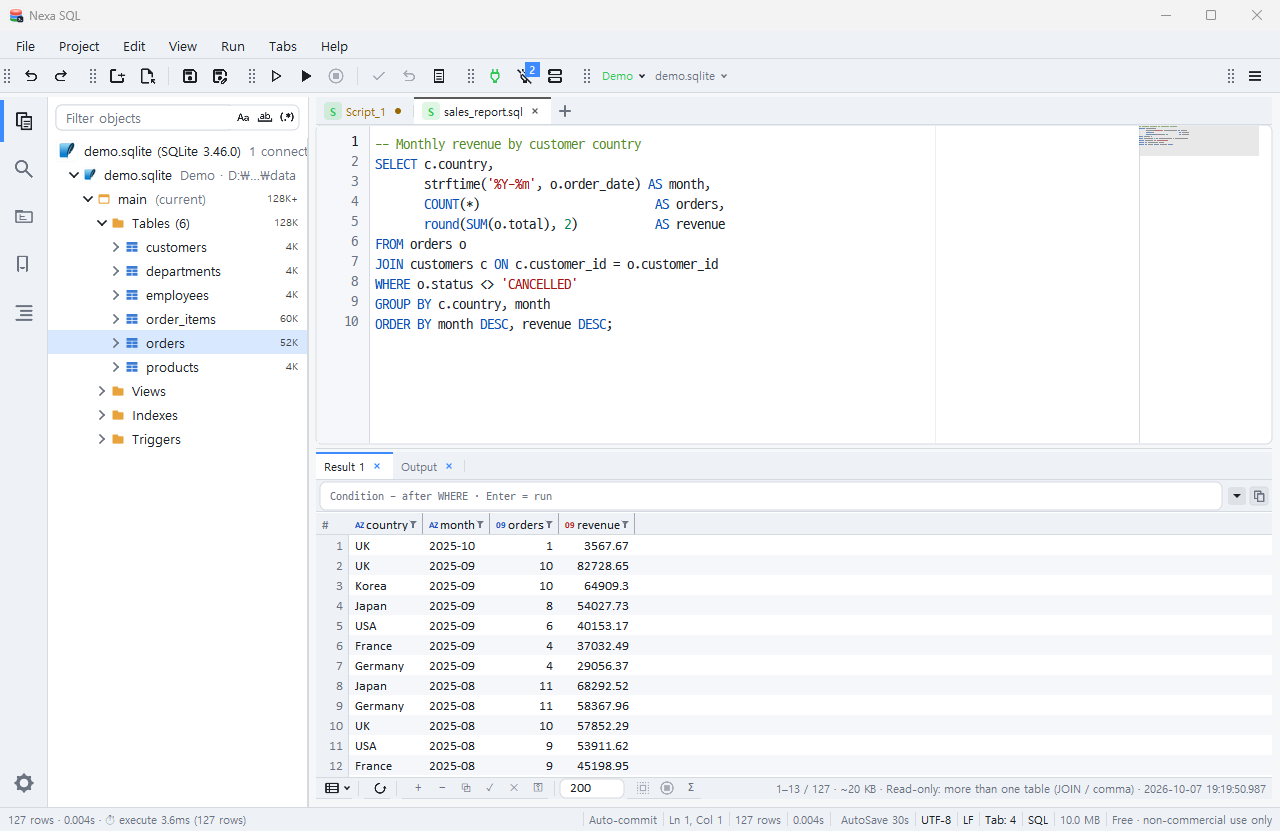
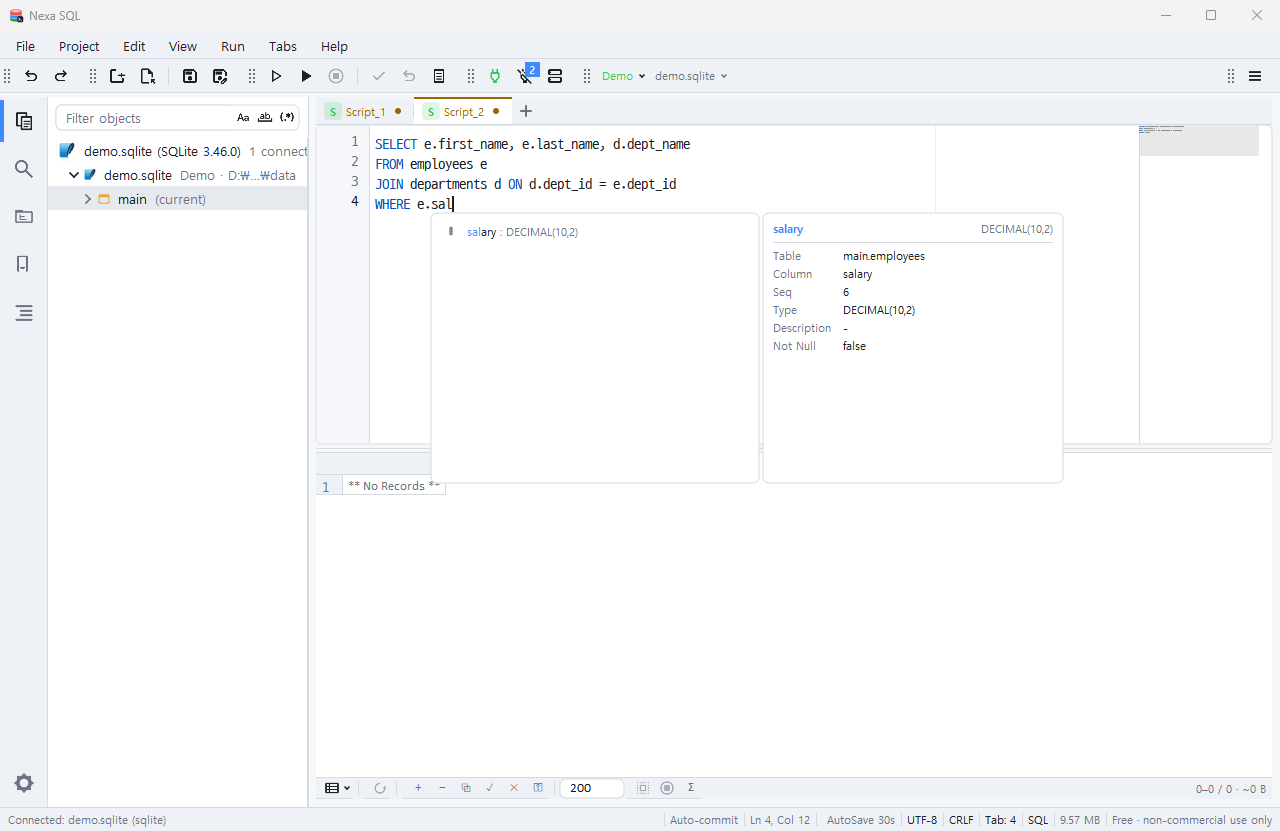
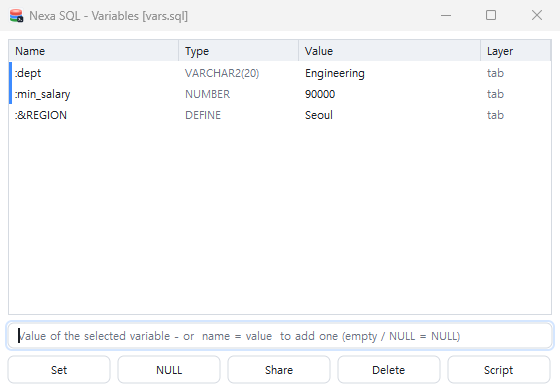
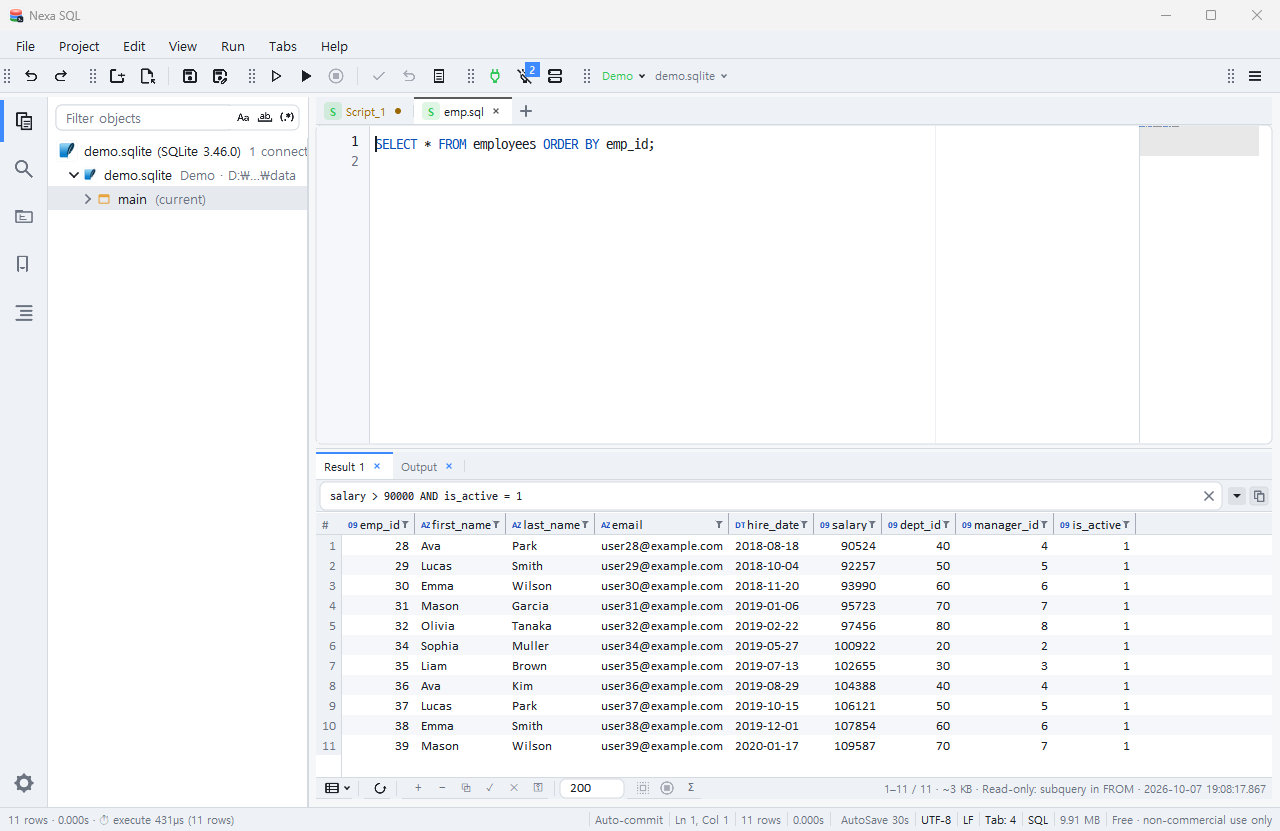
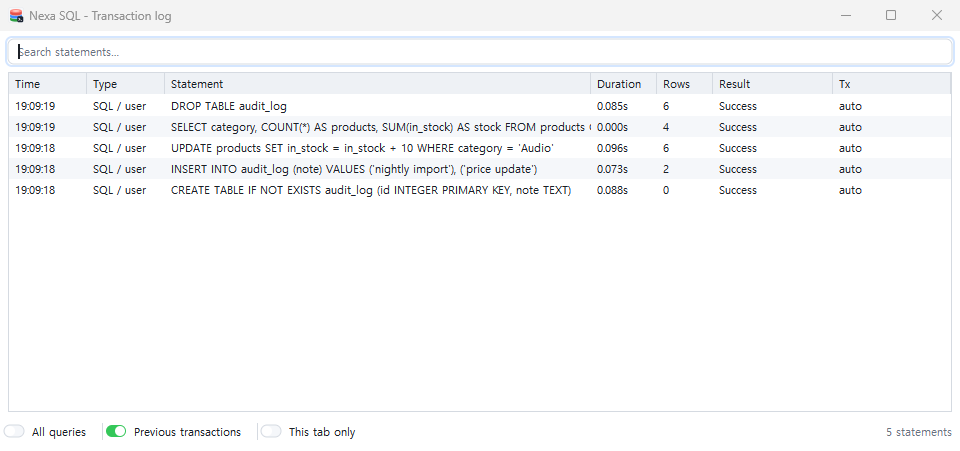
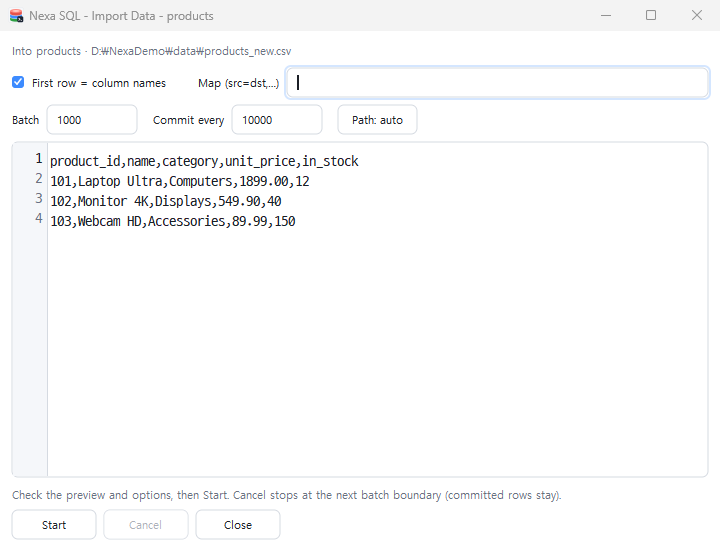
Key Features
- SQL*Plus-style session variables VAR · EXEC :V := value/expression · SELECT … INTO :V · PRINT · DEFINE/&substitution · REF CURSOR · CONNECT inside the editor. Even on SQL Server, the same variables carry across GO, and tab, connection-shared, and global layers plus connection-profile variables divide up their scope.
- Wide DBMS coverage · automatic driver installation Oracle (Thin · OCI) · SQL Server · PostgreSQL · MySQL/MariaDB · SQLite · DuckDB · IBM Db2 · ClickHouse · ODBC. The first time you connect, a signed driver package is downloaded, verified with SHA-256 and Ed25519, and installed. An offline bundle is available for closed networks.
- SSH tunnel · TLS Adds port forwarding through the system ssh to any connection (key authentication). PostgreSQL TLS can go as far as verifying the certificate chain and host name.
- One engine for GUI and CLI A script you ran on screen can be batch-run as-is with nsql run. Connection profiles, settings, and bookmarks are shared, and exit codes (0/1/2) let CI decide the outcome. The interactive shell has history search and Tab completion.
- The same UI on 3 OSes All Rust plus its own CPU rasterizer. With no Qt, WebView, or Electron, it runs with the same UI on Windows, macOS, and Linux; only the shortcuts follow each OS convention (Ctrl/⌘).
- An editor built on Sublime Text conventions Sublime default shortcuts · user .sublime-keymap · Goto Anything (Ctrl+P) · Command Palette · multiple cursors · Insert Sequence · bookmarks · Find in Files · minimap · color presets. Large files stay editable by turning off only the extra features, level by level.
- Context-aware code completion · error position guidance Suggests tables, columns, routines, and per-dialect data types, plus FK-based JOIN conditions and signature cards. Along with Ctrl object link cards, a failed statement moves the caret to the error position or a suspected typo.
- Result grid editing · Excel-style filters Edit results from a single table in the cells and apply them in one transaction. Column header type badges, value list filters, filter chips, OR mode, and condition bar re-queries are included, and a page overlap check notices when results change.
- Object Explorer · Find Objects Per-DBMS trees, object size, Open Source and compile as a single unit, Generate SQL, and CREATE statement diff. The Find Objects window searches names, descriptions, columns, and source bodies on all connected servers.
- Execution plan review Lays out execution plans as a common tree, and an automatic review tab points out problems. Actual execution plan actually runs the statement to show measured rows and times.
- Import · export Imports csv, tsv, json, jsonl, xlsx, and parquet with column mapping and suggested types, and can create a new table. Export streams its output, including Excel and Parquet, and the fast load path for each DBMS is chosen automatically.
- Output tab · logs · live monitor DBMS_OUTPUT, PRINT, RAISE NOTICE, and compile results in one place, colored by severity. The transaction log shows the statement sent, bind variables, and the statement with values substituted, and the Oracle live monitor watches DBMS_PIPE and long-running operation progress.
- Production server safeguards Production (PRD) connections have a read-only grid, a two-step held commit, and DDL backup before changes. Read-only profiles block changes from the GUI, scripts, and imports, and deleted profiles can be restored for 30 days.
- Encrypted connection profiles Only the password is sealed with ChaCha20-Poly1305 and stored in your user folder (with a DPAPI device key on Windows). Passwords you do not save are held encrypted in memory for the current run only. Profiles can be exported without passwords.
- WASM extensions · package repositories Like Package Control, it finds extensions through a repository index.json and installs them after SHA-256 verification. Code extensions load as sandboxed WASM without a restart, and nsql ext checks repositories.
About
Nexa SQL bundles a lightweight SQL client (IDE) that looks and behaves the same on Windows, macOS, and Linux with the command-line tool nsql. Everything is written in Rust, and its own CPU rasterizer draws the UI directly, with no Qt, WebView, or Electron. It is built for DB developers and DBAs who move between several DBMSs every day.
The range of supported connections has grown considerably. Oracle defaults to the Thin driver, which needs no Instant Client, and SQL Server, PostgreSQL, MySQL/MariaDB, SQLite, DuckDB, IBM Db2 (native DRDA driver), ClickHouse, and ODBC are also supported. Redshift, CockroachDB, YugabyteDB, Greenplum, and TimescaleDB connect through the PostgreSQL driver, and Tibero, Altibase, CUBRID, SAP HANA, and Informix through ODBC presets. The installer contains only the Oracle OCI driver; the others are downloaded as signed packages and installed the first time you connect, and an offline bundle is available for closed networks.
The signature feature is a script engine that brings SQL*Plus-style session variables to multiple DBMSs. VAR declarations, EXEC :V := value or expression, SELECT … INTO :V, PRINT, DEFINE and &substitution, REF CURSOR, and CONNECT inside the editor all work with the same syntax. The engine rewrites them as PL/SQL blocks with OUT binds on Oracle, sp_executesql with a trailing SELECT on SQL Server, and $n binds on PostgreSQL and SQLite, so even on SQL Server, multiple batches separated by GO keep using the same variables. You can preview the rewrite without a server using nsql plan.
The editor follows Sublime Text conventions. Its default shortcut set is the same as in Sublime, it has Goto Anything (Ctrl+P), the Command Palette, multiple cursors, bookmarks, and Find in Files, and it reads user .sublime-keymap files. It also offers context-aware code completion, Ctrl object links, per-dialect syntax colors with color presets, an SQL formatter with format presets, an Outline centered on declared names, a minimap, and multi-caret Insert Sequence. When a statement fails, the caret moves to the error position, and for syntax errors, to a suspected typo.
The result grid fetches 200 rows at a time and reads more as you scroll; with the row limit at 0, rows are appended as they arrive. Column header type badges, an Excel-style value list filter, and the condition bar narrow down results, and results from a single table can be edited in the cells and applied in one transaction. When the next page is fetched without a server cursor, the last row of the previous page is fetched again and compared, and if the result has changed, it stops rather than silently skipping rows. The Find Objects window searches names, descriptions, columns, and source bodies on all connected servers at once, and execution plan review shows a plan tree and an automatic review tab.
The nsql CLI provides 15 commands: run, shell, export, import, format, explain, plan, conn, driver, cat, config, grep, bookmark, license, and ext. Results go to stdout and messages to stderr, ready for pipes and CI, and the interactive shell has its own line editor with history search and Tab completion. Import accepts csv, tsv, json, jsonl, xlsx, and parquet and can even create a new table, and export streams its output, including xlsx and parquet. Bulk loading automatically chooses PostgreSQL COPY, SQL Server TDS bulk load, MySQL LOAD DATA, or Oracle OCI array DML.
On connections marked as production servers, the grid is read-only, changes are held until you press the two-step commit button, and DDL is backed up before objects change. Read-only profiles block all changes from the GUI, scripts, and imports. Connection profiles encrypt only the password, with ChaCha20-Poly1305, and on Windows the device key is protected by DPAPI. The app sends no telemetry and checks licenses with an offline file. However, it downloads the index and packages from GitHub to install and update drivers; with default settings, it reads the index once a day and installs newer versions first when connecting. All of this can be turned off in settings.
Some things are not there yet, and we say so. Oracle Thin does not support cancel during execution, implicit result sets, OS authentication, native encryption, or servers before 12c; for those, use OCI with Instant Client. SQL Server does not verify the server certificate, and the default PostgreSQL TLS mode can fall back to plaintext. MS Access support is experimental. There is no code signing, so SmartScreen and Gatekeeper warnings appear, and winget is not registered yet. Under the PolyForm Noncommercial 1.0.0 license, personal and non-commercial use is free, and commercial use requires a separate paid license (contact [email protected]).
Release Notes
v0.7.0 2026-11-07 Editor buffer compare · local history · restoring object source snapshots · declaration diffs · safer grid editing · window transparency.
Added
- Compare and local history — Compare two editor buffers (
edit.compare_with· several compare tabs kept) ·F7/Shift+F7jump between differences · a git change strip in the editor gutter (editor.git_gutter·Alt+F7to the next hunk) ·edit.historyopens the local history of saved files as a diff tab. - Object source snapshots — Source tabs for procedures, packages, views and so on keep snapshots when opened and right before each compile (
F5), and Restore from Local History… puts a snapshot back into the editor tab (nothing is sent to the server until you run it). - Declaration differences in Compare with Database Object — Comparing a
CREATEstatement with the server object now summarizes table column changes (added · removed · type/NULL · order) and procedure/function argument and return type changes on the compare header and in the Output tab. - Window transparency — The main window can be slightly transparent, more when it is in the background (
window.transparency·window.transparency_blur· Windows · macOS · X11).
Improved
- Safer grid editing — A UNIQUE key identifies rows only when all of its columns are NOT NULL, and before applying, new or changed key values are checked on the server in one round trip; nothing is written if a value already exists (
grid.edit_key_check). Header badges show how rows are identified (KEY · RID · ALL). - Dialect fixes — Server
SHOWpasses through on PostgreSQL · DuckDB · ClickHouse · overload selection by required argument count · PostgreSQLSET search_path/SET SCHEMAtracked for the session · MySQL 8.0.19+MERGErow alias · better opening of PostgreSQL function sources. - Drivers drivers-v0.1.11 — SQL Server
geography·geometry·hierarchyid·sql_variantcolumns read, no more panic importing into tables with UDT columns · Db2 zonedNUMERICand locator values decode. Withdriver.auto_installon, it installs on the next connection.
Fixed
- Choosing Skip/Stop on an import error silently lost the uncommitted earlier batch ·
nsql import --createdrops the table it created when nothing was imported · ClickHouse result grids are read-only · object sources opened from the details panel go to the right tab.
Changed
- Window transparency is on by default (focused 5% · inactive 10%) — set both to
0for the previous opaque window. Performance boost mode turns it off. grid.refetch_confirmnow defaults tooff— re-fetching a result no longer asks first, and a warning toast appears once per run when rows are replaced.history.enabled(on by default) — saved files and object sources are kept in the app data folderhistory/(50 per item · up to 200MB in total).grid.edit_key_check(on by default) makes one extra check query when applying edits that change keys.
Distribution
- 0.7.0 available on GitHub · Homebrew · APT/RPM, and Chocolatey 0.7.0 was approved on 2026-11-07 (checked 2026-11-07). On winget, the first-submission PR
#447007(0.5.0) has not been merged yet.
v0.6.0 2026-11-05 xlsx/parquet import · read-only profiles · syntax color presets · Oracle live monitor.
Added
- Import data: csv/tsv (encoding and delimiter detection) · json/jsonl · xlsx · parquet. Preview, column mapping, and creating a new table with suggested types ·
nsql importoptions such as--create·--sheet·--dry-run. - Connection profiles: deleted profiles kept for 30 days and restorable (
nsql conn deleted|restore) · read-only profiles · export/import without passwords. - Oracle live monitor (
oracle.live.pipe·oracle.live.longops·nsql run --live) · per-session filter in the Run Log · line-ending choice in the save dialog ·nsql ext check|pack|verify|list.
Changed
- Export defaults: the save dialog proposes
report_<timestamp>.xlsxinstead ofresult.csv(export.format·export.name_pattern). - Syntax colors: functions, data types, bind variables,
;, and commands get their own colors · presets witheditor.color_preset(nexa · dbeaver · golden).
Improved
- Dialect-aware SQL lexing (nested block comments ·
E'…'·GO n· reserved-word tables) · a dedicated toast when one session is lost · [Rollback] and [Commit & continue] on the hold card · typing in a 2 MB file about 52 ms → 6 ms per frame.
v0.5.0 2026-11-03 Format presets · xlsx/parquet export · driver auto-upgrade · project settings.
Added
- SQL formatter: river alignment · PL/SQL, T-SQL, and PL/pgSQL block re-indent · format presets (
format.preset). - Export: streaming export · new xlsx · parquet formats.
- Project settings section · per-syntax indentation · keymap conflict notes ·
selectorcontext · minimap toggle and auto-hide · object DDL bookmarks.
Changed
driver.auto_upgrade(on by default): connecting installs a newer driver first when the cached index lists one.project.hot_exit(defaultalways): quitting without a project keeps unsaved tabs without asking ·project.gitignore(on by default): the Goto index honors.gitignore.
Improved
- Clause-position-aware completion · Output line colors and
Ctrl+F· session column in the Run Log · drivers-v0.1.10.
Fixed
nsql shellmulti-line statements, listed in the 0.4.0 notes but missing from the binaries, are now actually included · false "run again?" confirmation on syntax errors.
v0.4.0 2026-10-30 SSH tunnel · PostgreSQL TLS · keymap files · nsql shell line editor.
Added
- SSH tunnel:
?ssh=user@host[:port](+ssh_key) on any connection · uses the systemssh· key authentication only. - PostgreSQL TLS:
pg.tls(defaultpreferred) ·sslmode·tls_ca· 20-second connect limit. - User keymap files (
.sublime-keymap) ·nsql shellline editor (Ctrl+R· Tab completion) · Insert Sequence · Copy with headers · SQL Server call timeout · extension ABI 1.3.
Improved
- Result consistency: OFFSET re-queries overlap and compare the last row of the previous page (
grid.overlap_check) · Db2 server cursors.
v0.3.1 2026-10-27 Continued fetching with server cursors in extension drivers too.
Fixed
- With extension drivers, auto-fetch after 200 rows asked to re-query or silently stopped. Updating to drivers-v0.1.7 continues with server cursors.
v0.3.0 2026-10-26 IBM Db2 · ClickHouse drivers · redesigned Outline · variable input dialog.
Added
- IBM Db2 (LUW · verified on 12.1) native DRDA driver · ClickHouse driver · MS Access (ODBC · experimental).
- Connection presets: Redshift · CockroachDB · YugabyteDB · Greenplum · TimescaleDB · SAP HANA · Informix.
- Variable input dialog · connection-profile variables (
nsql conn var) · hover value cards · settings export/import.
Changed
- Redesigned Outline · unified two-step confirmation for production Commit/Run · the Linux and macOS ODBC packages include a driver manager.
Fixed
- Commit stalls with ODBC auto-commit off · SQL Server ODBC cancel crash on Linux.
v0.2.9 2026-10-23 Execution plan review · Oracle Thin extension fallback fix.
Added
- Execution plan review: Explain plan · Actual execution plan ·
nsql explain [--analyze] [--raw].
Fixed
- Falling back to OCI and asking for Instant Client instead of using the installed Oracle Thin extension · driver auto-install in
nsql explain/import/export/cat.
v0.2.8 2026-10-23 Installer without drivers · MySQL/MariaDB · DuckDB · ODBC on all OSes.
Changed
- Separate drivers: the installer contains only Oracle OCI, and the others are downloaded as signed packages on first connect (
driver.auto_install· offline bundle). A once-a-day driver index check was added along with this.
Added
- MySQL · MariaDB · DuckDB · ODBC on all OSes ·
?driver=· Driver Manager ·nsql driver.
Note
- This version was not published to winget or Chocolatey.
v0.2.7 2026-10-21 Sharper Linux text · lower idle CPU · automatic aliases for qualified names.
Changed
- Linux text defaults now match macOS (hinting and pixel snapping off). Values you set yourself are kept.
Improved
- CPU while the card shows after a query: 2.4–3.0 s → about 0.45 s · lower CPU while warming up large schemas · automatic aliases for
FROM schema..
Fixed
- Per-OS default values not being applied · Chinese characters in the Linux UI drawn in Chinese glyph forms.
v0.2.6 2026-10-20 Caret to a suspected typo · Ctrl+click = add a caret.
Added
- Caret to a suspected typo in syntax errors (
editor.error_analyze) · new settings category Ctrl Key.
Changed
- Ctrl+click = add/remove a caret, Ctrl+right-click = editor menu.
ctrl.click·ctrl.right_clickselect the old behavior.
v0.2.5 2026-10-20 Caret to the error position · cleaned-up Find rules.
Added
- Caret moves to the error position (
editor.error_goto) · cleaned-up Find rules (editor.find_auto_scope).
Improved
- Column-mode Home/End move each caret within its own line.
v0.2.4 2026-10-17 Critical macOS screen flicker fix.
Fixed
- macOS blank-frame defect: drawing onto a surface the window server was still showing. macOS users should update.
v0.2.3 2026-10-17 macOS file opening · Korean paste fix · Explain plan shortcut change.
Changed
- Default shortcuts: Explain plan
Ctrl+Alt+X(macOS⌥⌘X) · macOS Find Objects⌥⌘O.
Fixed
- Opening files from the macOS Finder and Dock · Korean paste turning into
?· lostDBMS_OUTPUTon Instant Client 19.x.
v0.2.2 2026-10-16 Find Objects window · production held commit · object backup.
Added
- Find Objects window (
Ctrl+Alt+F): searches names, descriptions, columns, and source bodies on all connected servers. - Production held commit · object backup (
backups/objects/) · dragging explorer nodes.
Fixed
- Re-registered Windows
.sqland.nsql-projectfile associations.
v0.2.1 2026-10-15 Object Explorer description search · whole-server search · improved Korean input.
Added
- Explorer Include Description toggle · search scope (
explorer.search_scope). SQL Server now searches the whole server too.
Improved
- All input boxes share one Korean/English state · changing the server type immediately updates whether the grid can be edited.
v0.2.0 2026-10-14 Oracle Thin driver without Instant Client.
Added
- Oracle Thin driver (default · pure Rust). Switch with OCI through
oracle.driver. - NULL/empty string/value in the value window ·
Ctrl+;insert now · binary file notice tab · "Changed" switch in the settings window. - Linux network change and folder change watching.
Fixed
- Previous results remaining on a 0-row SQL Server result.
v0.1.9 2026-10-10 macOS network and folder watching · per-DBMS `&` substitution defaults · Oracle/PostgreSQL routine argument fixes.
Added
- Icons in the Object Explorer right-click menu (
ui.menu_icons) · Copy Name + Shift = copy full name (schema.object· SQL ServerDB.schema.object). - Package member ▸ Generate SQL ▸ Call = a named-bind call statement for that overload.
Changed
- Per-DBMS default for
&namesubstitution (script.define): Oracle prompts as SQL*Plus does, while other dialects replace only names defined withDEFINE/:setvar, so'R&D'does not bring up an input dialog. The CLI follows the same rule.
Improved (macOS)
- Network change detection (VPN · Wi-Fi) and folder change watching (FSEvents) now also apply to macOS. Trimming the drawing surface when idle reduces memory by about 40MB.
Fixed
- Position calculation overflow when dragging the scrollbar on results with hundreds of thousands of rows · Oracle package overload arguments shown combined · PostgreSQL function Arguments folder empty · undo of the first consonant in Korean composition.
v0.1.8 2026-10-09 Fixed automatic reconnect for tab-dedicated (CONNECT) sessions.
Fixed
- Tab-dedicated sessions did not reconnect after network recovery, causing repeated
DPI-1010. The password is taken from the in-memory encrypted store.
v0.1.7 2026-10-09 Progressive result display · natural sort · data type completion · CREATE statement diff viewer.
Added
- Progressive result display (with the row limit at 0, rows are appended as they arrive · per-batch stop and memory budget) · natural sort (
ITEM2 < ITEM10). - Per-dialect data type completion and user-defined types · side-by-side diff of CREATE statement ↔ server object.
Improved
- Server state propagation (network drop → everything on the same server marked disconnected · automatic recovery) · ■ twice = force stop.
Fixed
- Committing edits to CLOBs over 32KB · re-query after stopping returning only 200 rows.
v0.1.6 2026-10-08 Goto Anything · condition bar · Excel-style value filter · variable DROP/CLEAR.
Added
- Goto Anything (
Ctrl+P·>commands ·@symbols ·%text) · font sizeCtrl+=/Ctrl+-. - Grid condition bar · Excel-style value list filter · filter chips · column header type badges.
VAR x DROP [GLOBAL]·VAR CLEAR [GLOBAL|ALL]· Active column inSHOW VARIABLES· toast when a file is changed externally (3-way merge).
Fixed
- Three-part name and Decimal precision issues in SQL Server bulk load.
v0.1.5 2026-10-05 Linux repositories and Chocolatey channels begin · first winget submission.
Distribution
- pkg.sosomlab.com APT/RPM repositories launched · Chocolatey 0.1.5 approved · winget first submission (awaiting review).
Added
- Run object actions from
Shift+F10and the Command Palette · signature cards · picking filter values · re-query/OR.
v0.1.4 2026-10-04 173 DBMS icons · "System" display language · status bar/toolbar editing.
Added
- 173 DBMS product icons (light/dark) · status bar items · toolbar editing · display language defaults to System.
Improved
- SQL formatter:
EXEC·${name:format}·N'…'/q'[…]'·::casts.
v0.1.3 2026-10-02 Output tab · SSMS-style SQL Server explorer · server types · object deletion.
Added
- Output tab and
F5= run as a single unit in object source tabs · object deletion (after backing up the DDL) · server types (NON · DEV · TST · PRD). - SSMS-style SQL Server explorer (databases · linked servers · server security · DB size) · switching the working scope from the toolbar · three-part name completion.
v0.1.2 2026-09-30 SQL formatter · Ctrl object links · grid filters · extension management.
Added
- SQL formatter (
Shift+Alt+F· preview) · Ctrl object links and comment tooltips · grid filters · fast scrolling · object size · extension management.
Note
- v0.1.1 remained only as a release draft and was never published (Homebrew went from 0.1.0 to 0.1.2).
v0.1.0 2026-09-28 First public release.
Distribution
- Windows MSI · macOS pkg/dmg (Universal) · Linux deb/rpm installers and the Homebrew Cask. No code signing.
Added
- Oracle · SQL Server · PostgreSQL · SQLite connections · SQL*Plus-style session variable engine · result grid · Object Explorer · the
nsqlCLI.
Terms & Policies
Contact: [email protected]