Overview
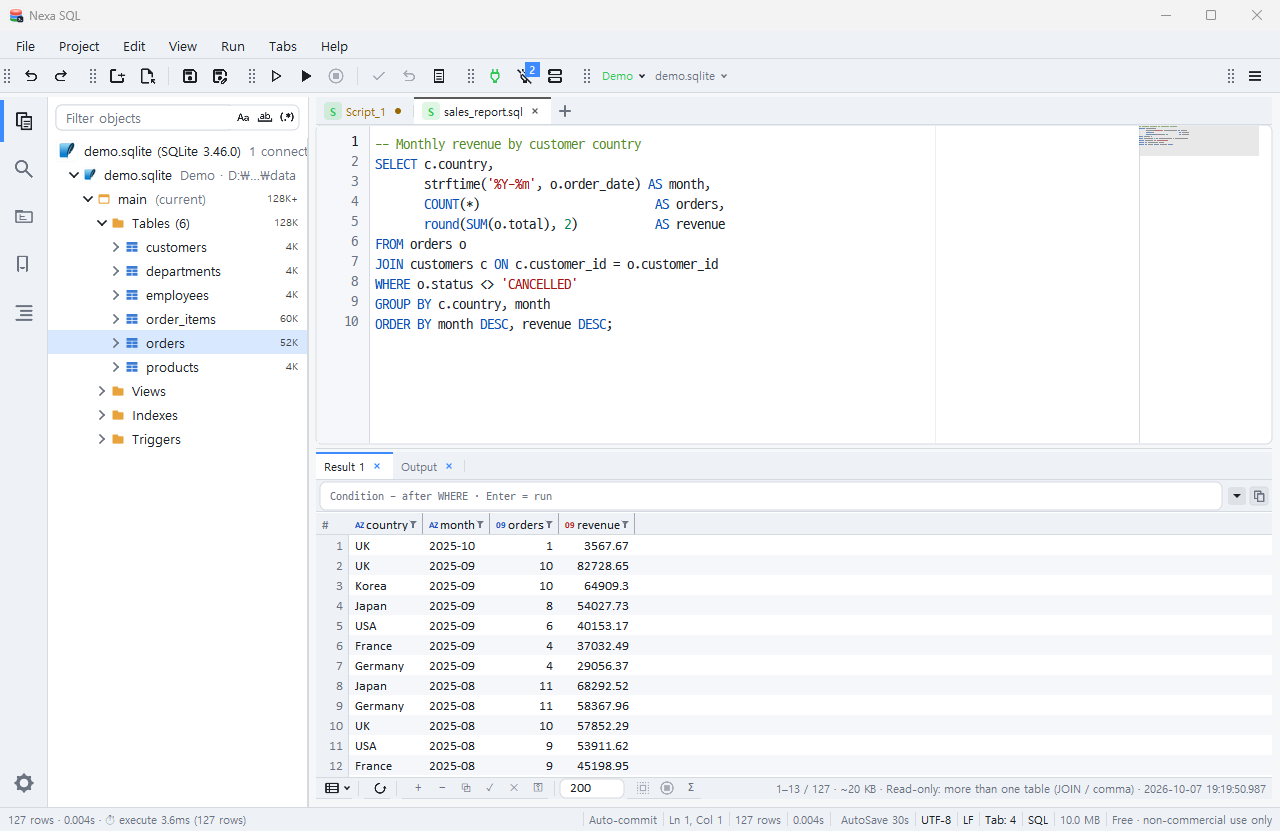
Nexa SQL bundles a lightweight SQL client (IDE) that looks and behaves the same on Windows, macOS, and Linux with the command-line tool nsql. Everything is written in Rust as a single executable, and the UI is drawn by its own CPU rasterizer — no Qt, WebView, or Electron.
It aims to be the tool DB developers and DBAs use every day.
- SQL*Plus-style scripts on every DBMS —
VAR·EXEC :V := …·SELECT … INTO :V·PRINT·DEFINE/&substitution· REF CURSOR ·CONNECTinside the editor work with the same syntax not only on Oracle but also on SQL Server, PostgreSQL, and SQLite. On SQL Server, the same variables carry over across multiple batches (GO). - GUI and CLI share one engine — a script you ran on screen can be batch-run as-is with
nsql run, and the GUI and CLI share connection profiles, settings, and bookmarks. - An editor built on Sublime Text conventions — the default shortcuts match Sublime Text (Goto Anything
Ctrl+P· Command PaletteCtrl+Shift+P· multiple cursors), and extensions install into a folder structure similar to Sublime packages. - Edit and filter right in the result grid — results from a single table can be edited cell by cell and applied in one transaction, and an Excel-style value filter and a condition bar narrow down results.
- Supported DBMSs (v0.7.0) — connects to Oracle (Thin · OCI) · SQL Server · PostgreSQL · MySQL/MariaDB · SQLite · DuckDB · IBM Db2 · ClickHouse, plus any DBMS with an ODBC driver (see DBMS Support Levels).
- Drivers are separate from the installer — the installer contains only the Oracle OCI driver; the others are downloaded as signed packages and installed the first time you connect. An offline bundle is available for closed networks (see Driver installation).
Note The app’s introduction page is at /apps/nexa-sql. Source code and releases are in the GitHub repository, and detailed per-feature documentation is in the wiki.
System Requirements
| OS | Requirements | Installers provided |
|---|---|---|
| Windows | Windows 10 1809 (build 17763) or later · x64 | .msi (per-machine install) |
| macOS | macOS 11 Big Sur or later · Apple Silicon and Intel (Universal) | .pkg · .dmg · Homebrew Cask |
| Linux | x86_64 · glibc 2.34 or later | .deb · .rpm · APT/DNF repositories |
- Recommended Linux packages:
libx11-6·libxkbcommon0·libwayland-client0, plusfonts-noto-cjkfor displaying Korean (for RPM:libxkbcommon·google-noto-sans-cjk-fonts), are installed together as recommended dependencies. - There is no portable (no-install) edition. Only installers are distributed.
Extra requirements per DBMS
| DBMS | What you need separately |
|---|---|
| Oracle (Thin · default) | Nothing. The oracle-thin driver installs automatically on first connect. The server must be 12c or later. |
| Oracle (OCI) | Oracle Instant Client is required (Windows oci.dll · Linux libclntsh.so · macOS libclntsh.dylib). It is not included in the installer, so download the Basic package from Oracle’s website. Without it, connecting fails with a DPI-1047 error. To connect with a TNS alias, you also need a TNS_ADMIN folder containing tnsnames.ora. Use this route for Oracle 11g servers and for features Thin lacks. |
| SQL Server · PostgreSQL · MySQL/MariaDB · SQLite · DuckDB · ClickHouse | Nothing (the driver package installs automatically on first connect) |
| IBM Db2 (LUW) | Nothing (native DRDA driver · no IBM client needed). IBM clidriver is needed only if you choose the ODBC route with ?driver=odbc. |
| Via ODBC (Tibero · Altibase · CUBRID · SAP HANA · Informix · MS Access, etc.) | The vendor’s ODBC driver, plus a DSN if needed. The ODBC driver package on Linux and macOS includes its own driver manager, so you do not need to install unixODBC separately. MS Access uses Windows ACE or, on Linux and macOS, MDBTools. |
Note Tibero, Altibase, CUBRID, SAP HANA, and Informix are ODBC presets, and MS Access support is experimental. We have not confirmed that every vendor server has been verified against a live server.
Installation and Removal
All installers are on GitHub Releases, and you can verify your downloads with the accompanying sha256sums.txt.
Caution Current builds are not code-signed. If you download and run them directly, Windows SmartScreen or macOS Gatekeeper will show a warning. Follow the OS-specific instructions below.
Installation channel status
Results of querying each channel directly on 2026-11-07.
| Channel | Command | Status |
|---|---|---|
| GitHub Releases | Download the installer directly | 0.7.0 |
| Homebrew Cask (macOS) | brew install --cask kiros33/tap/nexa-sql | 0.7.0 |
| APT · DNF repositories (Linux) | sudo apt install nexa-sql / sudo dnf install nexa-sql | 0.7.0 (repository registration required) |
| Chocolatey (Windows) | choco install nexa-sql | 0.7.0 (approved 2026-11-07) |
| winget (Windows) | winget install SosomLab.NexaSQL | Not registered yet — first-submission PR #447007 (currently 0.5.0) is waiting for human review |
Note Only winget is not registered yet. On Windows, use Chocolatey or the MSI from GitHub Releases. Chocolatey receives only some versions (0.2.8 and 0.2.9 were skipped, for example).
Windows
- Download
nexa-sql-0.7.0-windows-x64.msifrom Releases. - Double-click it to install. During setup you can choose to add
nsqlto PATH and to associate.sqlfiles (optional). - If SmartScreen shows the “Windows protected your PC” dialog, click More info → Run anyway.
Silent install (for management scripts):
msiexec /i nexa-sql-0.7.0-windows-x64.msi /qnVerify the downloaded file:
Get-FileHash .\nexa-sql-0.7.0-windows-x64.msi -Algorithm SHA256Removal: Uninstall Nexa SQL from Settings ▸ Apps (Add or remove programs).
macOS
Install with Homebrew (recommended)
brew install --cask kiros33/tap/nexa-sqlThe Cask removes the macOS quarantine flag during installation, so the app runs right away without warnings, and nsql is linked into Homebrew’s bin. To update, run brew upgrade --cask kiros33/tap/nexa-sql.
Install from an installer file
nexa-sql-0.7.0-macos-universal.pkg— running the installer creates/Applications/Nexa SQL.appand a/usr/local/bin/nsqllink.nexa-sql-0.7.0-macos-universal.dmg— drag the app into the Applications folder. See the instructions inside the dmg for linking the CLI.
If Gatekeeper blocks an app you downloaded directly, remove the quarantine flag.
xattr -dr com.apple.quarantine "/Applications/Nexa SQL.app"Removal
# If installed from pkg/dmg
sudo "/Applications/Nexa SQL.app/Contents/Resources/uninstall.sh"
# If installed with Homebrew (add --zap to also delete settings and profiles)
brew uninstall --cask kiros33/tap/nexa-sql
Linux
Register the package repository and install (recommended — update with apt upgrade/dnf upgrade)
APT (Debian · Ubuntu)
Register the repository (first time only) — skip this if you already registered it for another SosomLab app.
sudo curl -fsSLo /usr/share/keyrings/sosomlab-archive-keyring.gpg https://pkg.sosomlab.com/sosomlab-archive-keyring.gpg
sudo curl -fsSLo /etc/apt/sources.list.d/sosomlab.sources https://pkg.sosomlab.com/apt/sosomlab.sources
Install
sudo apt update && sudo apt install nexa-sqlRPM (Fedora · RHEL family)
Register the repository (first time only) — skip this if you already registered it for another SosomLab app.
sudo curl -fsSLo /etc/yum.repos.d/sosomlab.repo https://pkg.sosomlab.com/rpm/sosomlab.repoInstall
sudo dnf install nexa-sqlInstall from an installer file
sudo apt install ./nexa-sql_0.7.0_amd64.deb       # or sudo dpkg -i …
sudo dnf install ./nexa-sql-0.7.0-1.x86_64.rpmRemoval: sudo dpkg -r nexa-sql or sudo dnf remove nexa-sql.
Note Removing the app leaves your settings and connection profiles in your user folder (Settings and Data Locations). To remove everything, delete that folder manually.
Getting Started
First launch
- Launch the app. The display language defaults to System, so it appears in Korean on a Korean OS and in English otherwise. Each press of
Ctrl+Alt+L(macOS⌘⌥L) cycles System → English → Korean. - On first launch, it asks “Create a local SQLite demo?” Click Create now to get a
Demoprofile you can try right away without a server (the SCOTTdept/emptables and 5,000 rows ofsales). You can also create it later via Help ▸ Create Sample Data (Demo Profile)…. The demo needs the SQLite driver. If creation fails, see Creating the demo fails. - In the Connect dialog (
Ctrl+Shift+N, macOS⌘⇧N), pickDemoor enter a connection string and click Connect. If the required driver is missing, it is downloaded and installed first. - Type a statement in the editor, then press
Ctrl+Enter(macOS⌘↩) to run the statement at the caret, orF5to run the whole script.
SELECT * FROM emp ORDER BY sal DESC;Opening directly with launch arguments
nexa-sql Demo                                   # start and connect with a saved profile
nexa-sql -c "oracle://scott@dbhost:1521/ORCL"    # connect with a connection string (password asked in a dialog)
nexa-sql sqlite:demo.sqlite                      # SQLite file
nexa-sql --fill prod                             # only fill in the connect form, do not connect
nexa-sql .                                       # use the current folder as the working folder (folder mode)
Managing Connections
Connection string format
The GUI Connect dialog, CONNECT in the editor, and the CLI’s -c all accept the same format.
| DBMS | Format | Example |
|---|---|---|
| Oracle | oracle://user:pass@host:port/service | oracle://scott:tiger@dbhost:1521/ORCL |
| Oracle (SQL*Plus style) | user/pass@host:port/service | scott/tiger@dbhost:1521/ORCL |
| Oracle (administrator) | append as sysdba | oracle://sys@dbhost:1521/ORCL as sysdba |
| SQL Server | mssql://user:pass@host:port/db | mssql://sa@srv:1433/mydb |
| PostgreSQL | postgres://user:pass@host:port/db (postgresql:// · pg:// also work) | postgres://app@dbhost:5432/appdb |
| MySQL · MariaDB | mysql://user:pass@host:port/db (mariadb:// also works) | mysql://app@dbhost:3306/shop |
| IBM Db2 (LUW) | db2://user:pass@host:port/db | db2://db2inst1@dbhost:50000/SAMPLE |
| ClickHouse | clickhouse://user:pass@host:port/db | clickhouse://default@dbhost:8123/logs?tls=required |
| SQLite (file) | sqlite:<path> | sqlite:C:\data\app.db · sqlite:./app.db |
| SQLite (memory) | sqlite::memory: | For testing without a server |
| DuckDB | duckdb:<path> · duckdb::memory: | duckdb:a.duckdb |
| ODBC | odbc:DSN=<name> · odbc:Driver={…};Server=…;… | odbc:DSN=TIBERO_DEV |
| MS Access (experimental) | access:<file> | access:C:/data/file.accdb |
| PostgreSQL-compatible presets | redshift:// · cockroach:// · yugabyte:// · greenplum:// · timescale:// | Use the PostgreSQL driver |
| ODBC presets | tibero:// · altibase:// · cubrid:// · hana:// · informix:// | Install the vendor’s ODBC driver first |
- Default ports when omitted: Oracle 1521 · SQL Server 1433 · PostgreSQL 5432 · MySQL 3306 · Db2 50000 · ClickHouse 8123 (TLS 8443).
- If you leave out the password, you are asked for it in a hidden-input dialog when connecting. This is the recommended approach when typing by hand.
- If the password contains special characters, percent-encode them in URL format (
scheme://):@→%40,/→%2F,:→%3A,#→%23,%→%25. The SQL*Plus style does not decode, but it uses the last@as the host separator, so an@inside the password works as-is. - To specify only the dialect without a scheme, append something like
?dialect=oracle. The@still cannot be omitted (with no user:@dbhost:1521/ORCL). - Trailing parameters:
?driver=thin|oci|<id>(the driver for this connection) ·?ssh=user@host[:port]andssh_key=(SSH tunnel) ·?tls=·?sslmode=(Transport encryption). - Quick connect: enter the string in the top field of the Connect dialog and click Connect now; a profile is saved automatically (name =
dialect-host-DB). The password is not saved.
Caution Passwords typed on the command line remain in shell history and the process list. Save servers you use often as connection profiles (below).
Connection profiles
A profile stores dialect, host, port, DB, user, and password under a single name. The GUI and CLI share the same profile folder, so a profile saved in one is immediately usable in the other.
- GUI: In the Connect dialog, fill in the name field and connection details, then save. From then on, just pick the name to connect.
- CLI:
nsql conn add prod "oracle://scott@dbhost:1521/ORCL"     # password asked via hidden input
nsql conn add pg1 -d postgres --host dbhost --port 5432 --db appdb --user app
nsql conn list                                           # name · dialect · password saved (✓/-) · target
nsql conn test prod                                      # actually try connecting
nsql conn env prod prd                                   # mark the server type as production (PRD)
nsql conn readonly prod on                               # make the profile read-only
nsql conn deleted                                        # list deleted profiles
nsql conn restore prod                                   # restore a deleted profile
nsql conn import <file> --overwrite                      # import exported profiles (export with nsql conn export)
nsql conn rm prod
nsql conn var prod SCHEMA=HR # set a variable on this profile (NAME= removes it)- Profile names are 1–64 characters of letters, digits,
_,., and-, and can be used wherever a connection string goes, as in-c prodorCONNECT prodin a script. - If you set a server type (None · Development DEV · Test TST · Production PRD), production servers show a PRD chip, their result grids become read-only, and changing the type requires double confirmation.
- Read-only profiles (v0.6.0+): block data and schema changes in the GUI, scripts, and imports. Turn on with
nsql conn readonlyor?readonly=onin the connection string. - Restoring deleted profiles (v0.6.0+): a profile deleted in the Connect dialog moves to
profiles/.deleted/for 30 days (connect.deleted_keep_days) and comes back with the toast’s Undo ornsql conn restore.nsql conn rmdeletes right away. - Moving profiles (v0.6.0+): export and import without passwords from the File menu or with
nsql conn export·nsql conn import.
How passwords are stored
- Only the profile’s password is encrypted with ChaCha20-Poly1305; host and user name are plaintext because they must appear in the list.
- The encryption key is derived from this PC’s device key (
device.key). On Windows it is protected by DPAPI and can only be unlocked by the same Windows account. On macOS and Linux it is kept as an owner-readable-only (0600) file — be careful, since copying the whole folder elsewhere may let it be unlocked there too. - A password you enter when connecting without saving it to a profile is held encrypted in memory for the current run only and reused for new tabs, reconnects, and the Object Explorer on the same server and account. It is never written to disk; turn off the setting
connect.remember_session_passwordto be asked every time.
Oracle driver and client
There are two Oracle drivers. The default is Thin (oracle.driver = thin), which needs no Instant Client. OCI uses Instant Client and adds cancel during execution, implicit result sets, OS authentication, native network encryption, and 11g servers. Choose per connection with the database type Oracle (Thin) · Oracle (OCI) in the Connect dialog or with ?driver=oci in the connection string.
When using OCI, choose Automatic (default) or Specify manually in Settings ▸ DBMS ▸ Oracle. In automatic mode it searches NSQL_ORACLE_CLIENT_DIR → ORACLE_HOME → the OS library search path → well-known install folders, in that order, and shows the library found, its version, and whether tnsnames.ora and sqlnet.ora exist, as read-only information.
# Specify with an environment variable (restart the app to apply)
export NSQL_ORACLE_CLIENT_DIR=/opt/oracle/instantclient_21_13      # macOS · Linux
set NSQL_ORACLE_CLIENT_DIR=C:\oracle\instantclient_21_13            # Windows cmd
Sessions and disconnections
- By default, multiple tabs share one connection. A tab that ran
CONNECTin the editor gets its own dedicated session. Check open sessions in the Sessions window. - If the server becomes unreachable, for example when a VPN drops, all sessions and explorers for that server are marked as disconnected, the toast lists the affected shared sessions and dedicated tabs, and they recover automatically when the server responds again (setting
net.watch· Windows · macOS · Linux). If the server is reachable but one session is lost, a toast offers to reconnect that session only. - Auto-commit is on by default (
session.autocommit). If you turn it off, finalize changes yourself withCtrl+Alt+C(commit) ·Ctrl+Alt+R(rollback). - Call timeout (
session.call_timeout_secs· default 0 = off): on Oracle and SQL Server, ends a single server call that runs longer than this. SQL Server closes the socket and reconnects on the next run. It also applies to long queries, so turn it on only when needed.
Driver installation
The installer contains only the Oracle OCI driver. Other drivers are downloaded automatically from the drivers-v* releases of the official repository (SosomLab/nexa-sql) on first connect (driver.auto_install · on by default). Packages are checked against SHA-256 and an Ed25519 signature, then installed under <settings folder>/drivers/.
- Driver Manager: use View ▸ Drivers to install, update, remove, or install from a file.
- Update notice (
driver.check_updates· on by default): once a day at startup, the driver index is read; newer versions are listed one line per driver with an [Update all] button. - Automatic upgrade on connect (
driver.auto_upgrade· on by default · v0.5.0+): when connecting through an extension driver and the cached index lists a newer version, it is downloaded and installed first. A failed upgrade does not block the connection. Turn this off to keep the installed version. - Command line:
nsql driver search                    # index and install status
nsql driver install db2               # install
nsql driver update --check            # list updates only
nsql driver list                      # installed drivers
nsql driver rm db2                    # remove
nsql driver install --file nsql-drivers-all-0.1.10-windows-x86_64.zip # closed network: offline bundle- Closed networks: turn off
driver.auto_install·driver.auto_upgrade·driver.check_updates, then installnsql-drivers-all-<ver>-<os>-<arch>.zipobtained on another PC with the command above or the Driver Manager. Proxies followHTTPS_PROXY. - Packages exist for Windows x64, Linux x86_64, Apple Silicon, and Intel macOS.
SSH tunnel
Any connection can use port forwarding through the system ssh. Enter it in the SSH section of the Connect dialog or in the connection string; it is saved with the profile (for the key, only the path is saved).
nsql run -c "postgres://[email protected]:5432/appdb?ssh=me@bastion:22&ssh_key=~/.ssh/id_ed25519" report.sql- Key authentication only. It uses your
~/.ssh/config, agent, and default keys as they are and never asks for a password. An unknown host is accepted once on first use withStrictHostKeyChecking=accept-new. - Sessions to the same target share one
sshprocess, which ends when the last session closes. Settings aressh.command(empty = tunnels disabled) ·ssh.connect_timeout_secs(default 15 seconds). - With TLS, the driver sees the host as
127.0.0.1, so useverify_carather thanverify_identity.
Transport encryption (TLS)
- PostgreSQL: TLS is supported from v0.4.0. Choose with
pg.tls(or?tls=·?sslmode=). The defaultpreferredtries TLS and falls back to plaintext.required= encryption only (no certificate check) ·verify_ca= verify the certificate chain ·verify_identity= chain + host name. Set the CA file withpg.tls_caorsslrootcert=. Client certificates are not supported yet. - SQL Server:
mssql.encryptencrypts the whole session or the login only. The server certificate is not verified. - MySQL · ClickHouse · Db2: specify in the connection string, such as
?tls=required(MySQL also has themysql.tlssetting).
Caution On untrusted networks, use
verify_caor stricter rather thanpreferred, which can fall back to plaintext.
Production connection protection
In the GUI, connections whose server type is production (PRD) have the following safeguards. The nsql CLI does not hold changes.
- Held commit: changes run inside an explicit transaction and are finalized only by pressing the red Commit button in two steps. The hold card has [Rollback] and [Commit & continue] buttons. While held,
COMMIT;in a script is refused, and DDL that commits implicitly and changes from other tabs on the same connection are blocked. - Object backup: before DROP · CREATE OR REPLACE · ALTER · TRUNCATE · RENAME, the current DDL is saved to
backups/objects/. On a production connection, a failed backup blocks the statement.
Editor
The editor follows Sublime Text conventions. Its default shortcut set is also the same as Sublime Text’s (Keyboard Shortcuts).
Key features
- Multiple cursors and multiple selections —
Ctrl+D(add next occurrence) ·Alt+F3(all occurrences) ·Ctrl+Shift+L(split selection into a cursor per line) ·Ctrl+Alt+↑/↓(add a cursor on the line above/below). - Line editing — duplicate, delete, move up/down, and join lines; toggle comment (
Ctrl+/); convert case (Ctrl+K, Ctrl+U/Ctrl+K, Ctrl+L). - Soft Undo —
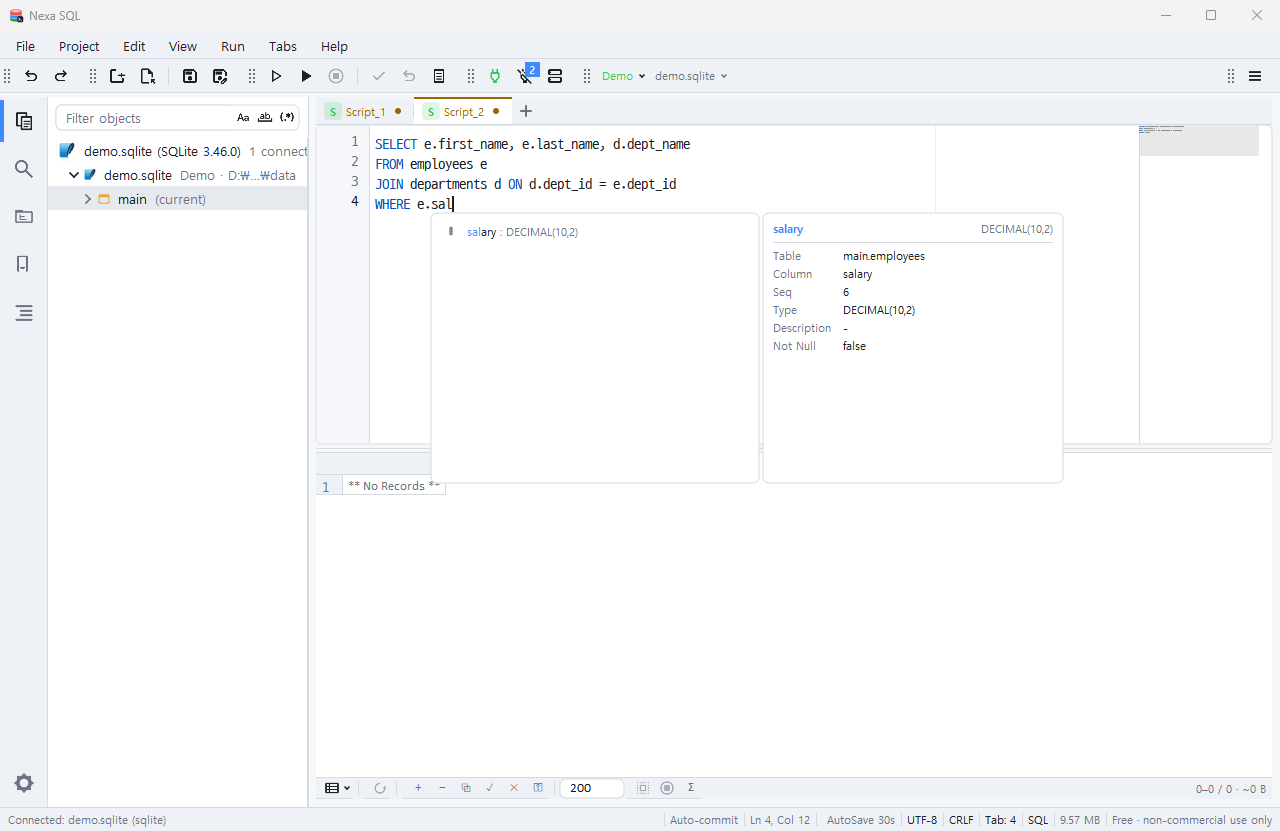
Ctrl+Uundoes only cursor and selection movements. - Code completion (IntelliSense) — suggests tables, columns, routines, data types, and keywords that fit the context. It builds JOIN conditions from foreign keys and shows function arguments in a signature card. Invoke it manually with
Ctrl+Space(macOS⌃Space); reload the metadata cache withCtrl+Shift+R. - Ctrl object links — while you hold
Ctrl(macOS⌘), table, column, and routine names become links, opening a card with a comment tooltip and action buttons (reveal in explorer · view 200 rows · copy description). Since v0.2.6, Ctrl+click adds or removes a caret and Ctrl+right-click opens the editor menu (restore the old behaviour withctrl.click·ctrl.right_click). Ctrl+Shift+click copiesname - description.F4= reveal in Object Explorer. - Goto Anything —
Ctrl+Pfuzzy-searches files across open tabs → recent files → project folders, in that order. Prefixes select the mode:>commands ·:line number ·@symbols ·%text ·?help; thename:lineformat is also accepted.Ctrl+Rjumps straight to a symbol. - SQL formatting —
Shift+Alt+Fapplies the built-in formatter (selection · statement at the caret · whole document). There are common options (format.*) such as comma position, spaces/tabs,WHERE 1=1, and alias alignment, and a preview tab shows the result first. Format presets (format.preset: default · kiros33 · river · custom) apply in one click with a 5-second undo. River (comma-first) alignment and PL/SQL · T-SQL · PL/pgSQL block re-indent (format.plsql) are also available. You can also set an extension formatter as the default. - Bookmarks —
Ctrl+F2toggles ·F2/Shift+F2next/previous ·Ctrl+Shift+0~9sets a numbered bookmark ·Ctrl+0~9jumps to that number. They appear in the gutter, the minimap, and as line-end labels, and the Bookmarks panel (Ctrl+Shift+B) collects them. Since v0.5.0 there are object DDL bookmarks that reopen a server object’s source, notes, and dragging between groups. - Find in files —
Ctrl+Shift+Fsearches an entire folder (some.gitignorerules are honored). It uses the same engine as the CLI’snsql grep. - Font size —
Ctrl+=/Ctrl+-/Ctrl+wheelchange only the focused area (editor or result grid). - Korean input — text being composed by the IME and undo are each handled as a single unit.
- Caret to the error position — when a statement fails, the caret goes to the position the server reported (
editor.error_goto). For syntax errors, it looks earlier in the statement for a word one or two letters away from a keyword (such asDISTINC), moves there, and leaves aSuspected typoline in the Output tab (editor.error_analyze). - Insert Sequence —
Ctrl+Alt+N(macOS⌘⌥N) inserts numbers, letters, dates, times, or lists in sequence at multiple carets. Write an expression such as1+1, and type?in the input for help. It is a built-in extension, so its settings and shortcut live in the extension area. - Outline — shows declared names (CREATE targets · routines · CTEs ·
DEFINE· cursors, etc.) as a tree that follows the caret. Turn on plain statements with the toggles next to the filter (Select · DML · DDL · Other). - Find — opening
Ctrl+Fselects the search text. Opening it with several lines selected keeps the selection, andeditor.find_auto_scopecontrols automatic scope. In column mode, Home/End move each caret within its own line. - Binary files — images, archives, and executables open in a read-only notice tab.
- Syntax colors (v0.6.0+) — data types, built-in functions of the connected dialect, bind variables, statement terminators, and commands each get their own color. Presets are
editor.color_preset(nexa · dbeaver · golden), and keywords follow per-dialect reserved-word tables. - Minimap (v0.5.0+) — toggle with View ▸ Minimap; it hides automatically in narrow editors and when idle. Supports zoom (
editor.minimap_scale), left-side placement, and modified-since-save and git-change marks. - Line-ending choice (v0.6.0+) — pick keep · LF · CRLF · CR in the save dialog.
Projects and workspaces
| Mode | How to enable | Where state is kept |
|---|---|---|
| File mode | Just launch the app | User settings folder |
| Folder mode | nexa-sql <folder> | That folder’s .nsql/ |
| Project mode | Open a <name>.nsql-project file | Inside the project file |
A project file holds the folder list plus the order of open tabs, caret positions, bookmarks, and even the text of unsaved scripts, so reopening it restores your last working state. Autosave (project.autosave) is on by default and saves every 30 seconds only when something has changed. The connection that was last open is only remembered as a marker; it is not reconnected automatically.
- Project settings (v0.5.0+):
.nsql-projectholds a per-project settings section. The Project switch in the settings window shows only allowed keys, and cards show where a value comes from. Per-syntax indentation and indent detection on open (editor.detect_indent) are also available. - Keeping unsaved tabs (
project.hot_exit· defaultalways· v0.5.0+): quitting without a project with unsaved tabs no longer asks; the tabs are kept and restored on the next start. Set it tooffto be asked as before. - The Goto Anything index honors the
.gitignoreat the project root (project.gitignore· on by default).
Large files
As a script grows, each tab gets a level that turns off only the costly extra features. Editing, selecting, finding, and running work the same regardless of size.
| Level | Threshold (either) | What is turned off |
|---|---|---|
| L1 | 5 MB or 100,000 lines | Minimap · same-word highlighting · line change markers · bracket colors |
| L2 | 20 MB or 300,000 lines | The above + syntax highlighting |
| Confirm before opening | 50 MB | — |
To turn everything back on for just this tab, run Toggle Large File Optimizations (This Tab) from the Command Palette.
Running Queries and the Result Grid
Running
| Action | Windows · Linux | macOS |
|---|---|---|
| Run statement at caret | Ctrl+Enter | ⌘↩ |
| Run into a new result tab | Ctrl+\ | ⌘\ |
| Run whole script | F5 | F5 |
| Next / previous statement | Alt+↓ / Alt+↑ | ⌥↓ / ⌥↑ |
- Statements are split by
;, a standalone/, andGO, just as in SQL*Plus. - While running, the execution status card shows the statement, start time, elapsed time, row count, and transfer volume. Stop with ■; if the server does not respond to the cancel, press ■ once more to force-stop.
- In a tab for a procedure, package, view, etc. opened with Open Source from the Object Explorer,
F5sends the body as a single unit without splitting it, compiling it in one go. - Execution plan review: Run ▸ Explain plan (
Ctrl+Alt+X, macOS⌘⌥X) shows a plan tree and an automatic review tab without running the statement. Run ▸ Actual execution plan actually runs the statement to show measured rows and times, so DML changes data. The CLI equivalent isnsql explain [--analyze] [--raw].
Result grid
- Fetching: By default it fetches 200 rows at a time (
grid.max_rows) and reads the next 200 when you scroll to the end. Count rows with Σ, and read to the end with Fetch All. With the row limit set to 0, the first batch appears immediately and the rest is appended as it arrives. Result memory stops at 1 GB (grid.memory_budget_mb). - Result consistency: when the next page comes from an OFFSET re-query with no server cursor, the last row of the previous page is fetched again and compared; if the server result changed, it stops with an error instead of skipping or duplicating rows (
grid.overlap_check· on by default). It asks first when everything must be re-fetched from the start (grid.refetch_confirm). - Multiple results: With REF CURSORs or multiple result sets, tabs
Result1·Result2… open. - Column header type badges:
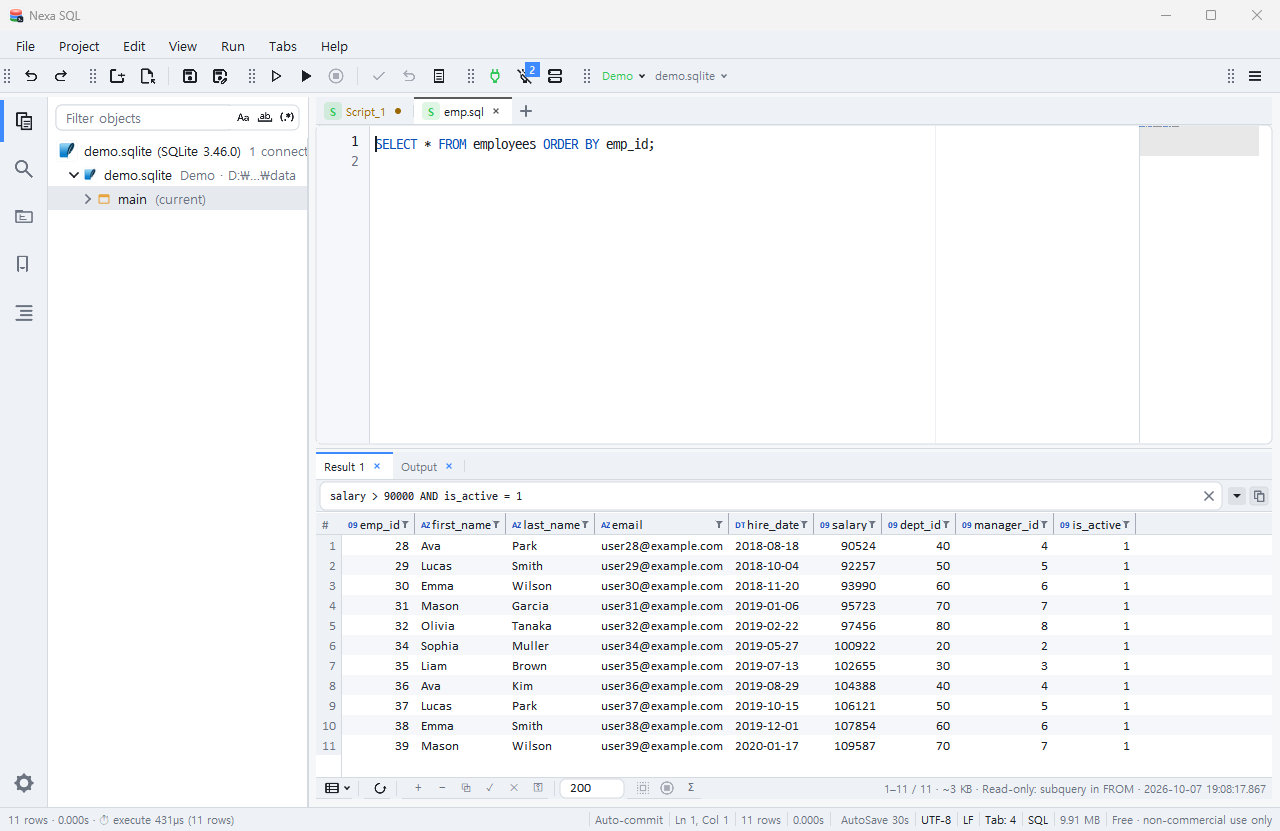
AZ(text) ·09(number) ·DT(date) ·ID·TF·BI·EXshow each column’s type at a glance; hover over a header to see a data type card. - Filters: The funnel on a column header opens an Excel-style value list (Select All · search · multi-select), combined with filter chips and OR mode. Type an expression in the condition bar below the grid and press Enter to re-query the server (you can also drag and drop a column header).
- Natural sort: Numeric parts are compared by value, as in
ITEM2 < ITEM10(ui.sort_natural). - Output tab: collects
DBMS_OUTPUT·PRINT/RAISERROR·RAISE NOTICE· compile results · errors · statement-completion lines (Ctrl+Shift+O). Double-clicking an error line goes to that line in the editor. Error lines are red, warning lines yellow, andCtrl+Fsearches inside the tab. - Oracle live monitor (v0.6.0+): watch
DBMS_PIPE(oracle.live.pipe) andV$SESSION_LONGOPSprogress (oracle.live.longops) as the Live log kind during a run. The CLI equivalent isnsql run --live. - Value view:
Shift+Enteror Shift+double-click opens the value window. For editable text cells, choose NULL · empty string · value. - Copy: the context menu has Copy with headers (space · comma · tab) and Copy headers only.
- Transaction log: Records time, row count, result, and transaction outcome (committed · rolled back · pending) for each statement run; click a row to see three layers: statement sent / bind variables / statement with values substituted.
Editing data in the grid
Results queried from a single table can be edited directly in the cells. Your edits are not sent to the server until you click Apply (✓), and applying is wrapped in one transaction — if any part fails, everything is rolled back.
- Start editing: Enter ·
F2· double-click · just start typing. Confirm: Enter · Tab. Cancel: Esc. In date and time cells,Ctrl+;= now, matching the column type ·Ctrl+Shift+;= current time. - Supports adding, duplicating (
Ctrl+D), and deleting rows, pasting tab/line-delimited tables, grid-specific undo, and previewing the SQL to be sent. - Rows are identified in this order: PK/UNIQUE key → (if the key is not in the result) a hidden key column → the DBMS row identifier (Oracle
ROWID· SQLiterowid· PostgreSQLctid) → all comparable columns. - Results with JOIN · GROUP BY · DISTINCT · UNION · expression columns, view and procedure results, and production (PRD) servers are read-only. ClickHouse does not support grid editing.
Find Objects and Explorer Search
The Find Objects window (Ctrl+Alt+F, macOS ⌘⌥O · View ▸ Find Objects) searches object names, descriptions (comments), column names, and source bodies across all connected servers at once.
- It offers case · word · regex toggles, a schema filter, multi-server selection, a SQL Server all-databases switch, and a result filter box. You can stop at any time.
- Clicking a matching line opens that object’s source at that line in a preview tab (
findobj.preview_click). Double-click opens a regular tab, and Reveal in Object Explorer finds the column too. - The Object Explorer filter searches the whole server by default (
explorer.search_scope). Turn on the Include Description toggle (explorer.search_desc) to match comments as well. - Dragging an explorer row to the editor, a filter box, or the condition bar inserts its name (Shift = full name).
Session Variables (SQL*Plus Style)
This is Nexa SQL’s signature feature. The engine rewrites SQL*Plus variable syntax into each dialect so you can use it as-is on DBMSs other than Oracle.
Two kinds of variables
| Kind | Syntax | Where it is handled |
|---|---|---|
| Bind variables | VAR v NUMBER · EXEC :v := value · EXEC :v := expression · :v inside statements | Literal assignment on the client (no server round trip); expressions evaluated on the server. Values are passed as real binds |
| Substitution variables | DEFINE v = text · &v · &&v · ${v[:format]} · ${env:NAME} | The client replaces the text before sending the statement |
Example
-- Declaration and literal assignment (no server round trip)
VAR V_LIMIT NUMBER = 3
EXEC :V_DEPT := 'IT'

-- Assignment from a server expression
EXEC :V_CNT := (SELECT COUNT(*) FROM emp)

-- One row into several variables (error on 0 rows or multiple rows)
EXEC SELECT MAX(sal), MIN(sal) INTO :V_MAX, :V_MIN FROM emp WHERE dept = :V_DEPT;

-- Use as binds in later statements
SELECT * FROM emp WHERE sal >= :V_MIN AND ROWNUM <= :V_LIMIT;

PRINT V_MAX
SHOW VARIABLES
The same script is rewritten and run as BEGIN … END; blocks with OUT binds on Oracle, as sp_executesql with a trailing SELECT on SQL Server, and as $n binds with single-row queries on PostgreSQL and SQLite. You can preview the rewrite without a server using nsql plan -d mssql file.sql.
Note In SQL Server,
@nameis T-SQL’s own variable and disappears when the batch (GO) ends. To carry a value across batches, use:name.
Scopes (layers) and clearing
- Variables live in the tab → connection-shared (SHARE) → global (GLOBAL) layers, and the tab value wins when names collide. You can set the layer when declaring:
VAR A NUMBER = 10 GLOBAL·VAR x VARCHAR2(30) SHARE. - Assignment goes into the layer where the variable lives. To use a different value in just this tab, first declare it in the tab with
VAR A. - Clearing:
VAR name DROP [GLOBAL]·VAR CLEAR·VAR CLEAR GLOBAL·VAR CLEAR ALL. - A variable created without a type changes type according to its value; declaring it with a type fixes the type.
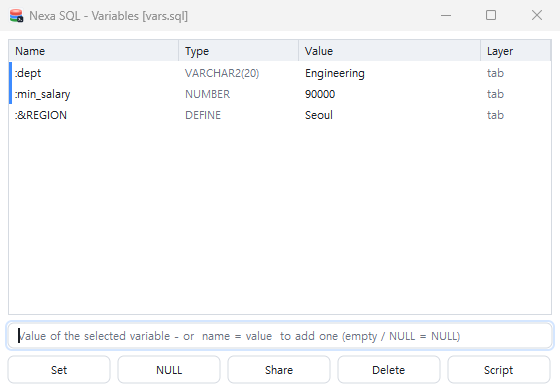
- In the Variables window (View ▸ Variables · toolbar [Variables]), you can view and edit the name, type, and value in every layer. Names that look secret, such as
PASSWORD, are masked. - Input dialog: for variables with no value, the dialog asks with a preview of the type and of what will be sent to the server. Hovering over a variable in the editor shows a value card.
- Connection-profile variables: attach variables to a profile (
nsql conn var).DEFINE name SHARE|LOCAL|GLOBALalso sets the layer of a substitution variable. - Bind visibility: the run log shows how values were sent, as
bind N·declare-prepend·inline N.
Substitution variables and &
${v:q}= wrap as an SQL string literal ·${v:id}= quote as an identifier ·${env:PATH}= OS environment variable.- Script arguments are received as
&1 &2 …(nsql run file.sql arg1 arg2). - Per-DBMS
&default behavior (v0.1.9+): Oracle prompts for undefined&namewith an input dialog, as SQL*Plus does. SQL Server, PostgreSQL, and SQLite replace only names defined withDEFINE·:setvarand send an undefined&xas-is, so'R&D'raises no prompt. Change it with the settingscript.define(auto · on · off) orSET DEFINE ON/OFFin a script. To keep&literal inside strings, turn offscript.define_in_strings(v0.5.0+ · on by default). - Built-in variables:
${workspaceFolder}·${file}·${fileBasenameNoExtension}·${profile}·${dialect}·${config:key}and others, with the same names as in VS Code, can be used in scripts and path settings.
SPOOL ${workspaceFolder}/out/${fileBasenameNoExtension}.log
SELECT '${profile}' AS who FROM dual;
SPOOL OFF
Common SQL*Plus-style commands
CONNECT target · SET DEFINE OFF · SHOW ERRORS · DESC name · @file args… · @@file (relative to the calling script’s folder) · SPOOL file [APPEND] / SPOOL OFF · WHENEVER SQLERROR EXIT. For psql, sqlite3, and sqlcmd users, aliases such as \d · \dt · .tables · \i · :r · \c also work. Use PROMPT to print a line of text. Outside SQL Server, PRINT 'text' shows a one-line hint and continues with the next statement.
Exporting Data
Copying from the screen
From the result grid’s right-click menu, copy as Copy with Headers · CSV · Text · Markdown · JSON · SQL (SELECT/INSERT/UPDATE/DELETE/MERGE). The SQL formats choose the key in the order PK → first unique index → first 3 columns, and add a warning comment when falling back to the first 3 columns.
Caution If you see the “first 3 columns” warning, check the
WHERE/ONclause yourself before running. If those 3 columns do not uniquely identify a row, more rows than intended will be changed.
Exporting to a file
Save with Export to File in the result grid (Excel · CSV · TSV · JSON · JSON Lines · SQL INSERT · Parquet). The default file name is report_<timestamp>.xlsx (export.format · export.name_pattern), and export.source controls the data source. On the command line, use nsql export.
nsql export -c prod -t EMP -f csv -o emp.csv
nsql export -c prod -q "SELECT * FROM emp WHERE deptno=10" -f json -o dept10.json
nsql export -c prod -t EMP -f insert:EMP_BACKUP -o seed.sql
nsql export -c pg1 -t big_table -f csv --fast -o big.csv    # uses PostgreSQL COPY TO
Formats: csv (default) · tsv · json · jsonl · insert[:table] · xlsx · parquet (v0.5.0+). Output streams in batches, so the full result is not held in memory. --fast has the server produce csv/tsv itself (PostgreSQL); if unsupported, it notes this and exports through the normal path. You can also capture script results directly, as in nsql run -f csv query.sql > out.csv.
Importing from a file (Import)
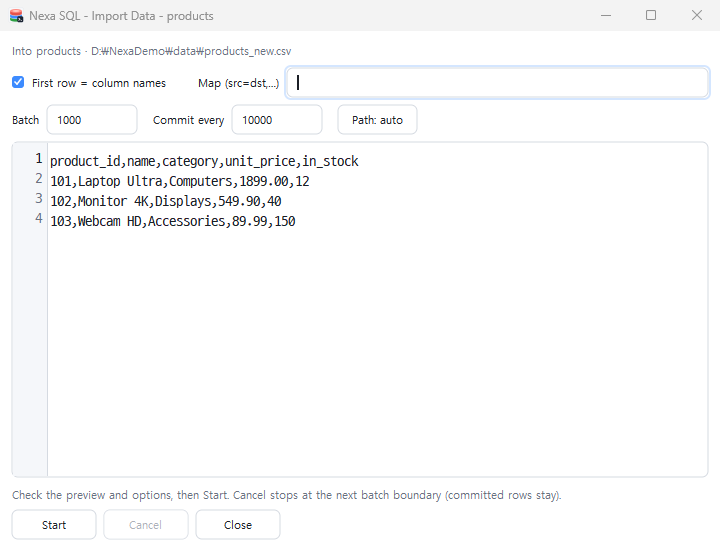
Loads CSV · TSV · JSON · JSON Lines · xlsx · Parquet (v0.6.0+) into a table with INSERT only (existing rows are not changed). Encoding and delimiter are detected automatically, and you can create a new table with suggested types.
- GUI: Run ▸ Import Data from File… or right-click a table in the Object Explorer ▸ Import Data → choose the source → check the preview, column mapping, batch size, and commit interval → Start.
- Command:
nsql import -c prod -t EMP emp.csv
nsql import -c prod -t EMP -f tsv --map emp_no=EMPNO,name=ENAME --commit-every 5000 emp.tsv
nsql import -c prod -t SALES --create -f xlsx --sheet 2024 --dry-run sales.xlsx   # new table · dry run
The auto path picks the DBMS’s fast route: Oracle OCI array DML · PostgreSQL COPY … FROM STDIN · SQL Server TDS bulk load · MySQL LOAD DATA LOCAL INFILE. Without a fast route (Oracle Thin, SQLite, etc.), it uses multi-row INSERT. If a batch fails, rows are retried one by one to report which row and line of the file caused which error, along with how many rows were committed before it. For all-or-nothing, set the commit interval to 0.
CLI nsql
nsql is a command-line tool that uses the same engine, the same profiles, and the same settings file as the GUI. Result data goes to stdout, while connection notices, progress, and warnings go to stderr, so you can capture just the data with > file.
Command list
| Command | What it does |
|---|---|
run | Run a script (a file, or - = standard input) and print the results |
shell | Interactive shell (sqlplus/psql style · variables kept for the session) |
export | Export a query or an entire table to a file |
import | Bulk-load csv/tsv/json/jsonl/xlsx/parquet into a table |
format | Tidy SQL with the built-in formatter |
explain | Execution plan with automatic review (--analyze = actually run · --raw = DBMS raw output) |
plan | Analyze a script without connecting (statement splitting · variables · per-dialect rewrite) |
conn | Manage connection profiles |
cat | Catalog — schemas · objects · columns · source · compilation errors · DDL generation |
config | View and change settings (shared with the GUI) · export / import to move them |
grep | Search file contents (same engine as the GUI’s Find in Files) |
bookmark | Bookmarks (same workspace file as the GUI) |
license | License status · request code · installation |
driver | Search, install, update, and remove driver packages |
ext | Extension repository tools (check · pack · verify · list) |
nsql --help and nsql <command> --help are the final reference for arguments, options, and examples. The first line of nsql --help shows the version and variant (lite/full).
Examples
# Try it right away without a server
echo "SELECT 'hello' AS a, 1+1 AS n;" | nsql run -c "sqlite::memory:" -

# Running scripts · output formats
nsql run -c prod report.sql
nsql run -c prod -f markdown query.sql > result.md
nsql run -c prod --max-rows 1000 --timing big.sql
nsql run -c prod -v deptno=10 report.sql          # define a substitution variable before running (&deptno)

# Interactive shell
nsql shell -c prod

# Catalog
nsql cat -c prod tables
nsql cat -c prod -s HR columns EMPLOYEES
nsql cat -c prod source packages PKG_ORDER
nsql cat -c prod gen merge EMPLOYEES

# See the per-dialect rewrite without connecting
nsql plan -d mssql session-vars.sql

# Settings
nsql config set ui.lang ko
nsql config get grid.max_rows
Interactive shell
Running nsql shell in a terminal turns on its own line editor.
| Action | Keys |
|---|---|
| Move the cursor | ← → · Home / End · Ctrl+A / Ctrl+E |
| Move by word | Alt+B / Alt+F · Ctrl+←→ · Alt+←→ |
| Delete | Ctrl+U · Ctrl+K · Ctrl+W · Alt+D · Alt+Backspace |
| Undo · redo · yank | Ctrl+Z · Ctrl+Y · Alt+Y |
| History | ↑ ↓ · Ctrl+R (reverse search) |
| Completion | Tab — the same context engine as the GUI (keywords · tables · columns) |
| Multiple lines | Alt+Enter inserts a newline · history keeps whole statements |
- History is saved in plaintext in
shell_historyin the settings folder (cli.history_max· default 500 · 0 = off). A password written in a connection string can remain there as-is. SHOW VERSION·SHOW AUTOCOMMITand the shell’sshow(settings table) are supported. The shell followssession.autocommit, whilensql runstays manual with a commit at exit.- The n in the
nsql*n>prompt is the number of pending transactions.autocommit=works in profiles and connection strings, and nothing is asked interactively when stdin is not a terminal.
Passing passwords
The lookup order is -p → environment variable NSQL_PASSWORD → (in a terminal) hidden input. With --no-prompt, it fails instead of asking (for CI). To keep the password out of the command line and shell history, use --password-stdin to read it from the first line of standard input.
echo "$PW" | nsql run --password-stdin -c "oracle://scott@dbhost:1521/ORCL" script.sql
NSQL_PASSWORD='s3cr3t' nsql run -c "postgres://app@dbhost:5432/appdb" --no-prompt migrate.sql
Output formats and exit codes
-f:grid(default) ·markdown·csv·tsv·json·jsonl·sql:select|insert|update|delete|merge·insert:<table>.- Table layout:
--width <n|auto>·--max-col-width <n>·--overflow none|wrap|truncate|expanded·-x(record view). Inside the shell:set format markdown·\x·copy markdown(copies the last result to the clipboard). - Set persistent defaults like
nsql config set cli.format markdown. Precedence is shellset> command-line flags >cli.*settings. - Exit codes: 0 = all succeeded · 1 = one or more failed (line number on stderr for each failure) · 2 = usage or connection error.
- By default, the CLI does not use global variables (so batches are not affected by values from the GUI). To share them, run
nsql config set vars.cli_global on.
Extensions (Sublime Packages)
Nexa SQL extensions work much like Sublime Text’s Package Control. The package list is read from a repository’s (folder or URL) index.json, and each package’s extension.json declares its files and SHA-256 hashes, which are verified before installation.
Enabling the Extension Manager
The Extension Manager is off by default (extensions.enabled). Run Extension Manager: Enable Extension Manager from the Command Palette (Ctrl+Shift+P) to turn it on, then use the Install Extension · Remove · List · Enable/Disable · Add Repository commands. Repositories are read only when you run a manager command; they are never queried automatically.
Extensions in the official repository (as of v0.6.0)
| Extension | Version | Description |
|---|---|---|
| Rainbow Pairs | 1.1.2 | Colors bracket and quote pairs by depth · jump to pair/sibling/parent/child |
| SQL Formatter for kiros33 | 1.3.5 | Formatter with tab-aligned AS and operators, WHERE 1=1, and set-operator divider lines |
| Project Explorer Menus | 0.2.0 | Right-click menus for the open file and Project Explorer rows (open · reveal · copy path) |
| Insert Sequence | 0.1.1 | WASM version of multi-caret sequence insertion — replaces the built-in when installed |
| Uppercase Selection | 0.1.0 | Stateful extension sample (ABI 1.3) — uppercases the selection through the editor read/write API |
| Hello Extension | 0.3.0 | SDK sample — a command that writes one log line |
- Code extensions run as WASM within fuel, memory, and time limits. Installing or removing them does not require restarting the app.
- Data packages such as syntaxes, themes, snippets, and keymaps are placed in
<settings folder>/Packages/<package>/. A user syntax definition placed as<settings folder>/Packages/<package>/<name>.nexa-syntaxoverrides the built-in syntax. - The default repository is
https://raw.githubusercontent.com/SosomLab/nexa-sql/main/extensions, and you can add folders or URLs with the same structure via Add Repository. To build an extension, seeextensions/sdk/in the repository (Rust →wasm32-unknown-unknown).
Note The syntax file format in v0.6.0 is its own
.nexa-syntax. The package folder layout and keymap files (.sublime-keymap) follow Sublime, but.sublime-syntaxfiles are not read as-is. When building an extension repository, check it withnsql ext check·pack·verify.
Keyboard Shortcuts
Ctrl on Windows and Linux is ⌘ on macOS. The tables below list the macOS column separately (⌃ = Control, ⌥ = Option). Every shortcut can be changed with the setting key.<command id> or in the shortcut capture dialog, and key.preset (auto · windows · macos · linux) selects the default set.
Files, tabs, and view
| Action | Windows · Linux | macOS |
|---|---|---|
| Command Palette | Ctrl+Shift+P | ⌘⇧P |
| Goto Anything (files · commands · symbols) | Ctrl+P | ⌘P |
| New tab | Ctrl+N / Ctrl+T | ⌘N / ⌘T |
| Open · Save · Save As | Ctrl+O · Ctrl+S · Ctrl+Shift+S | ⌘O · ⌘S · ⌘⇧S |
| Close tab | Ctrl+W | ⌘W |
| Next · previous tab | Ctrl+Tab · Ctrl+Shift+Tab (Ctrl+PgDn/PgUp) | ⌃Tab · ⌃⇧Tab (⌘⌥→/←) |
| Preferences | Ctrl+, | ⌘, |
| Connect dialog | Ctrl+Shift+N | ⌘⇧N |
| Object Explorer | Ctrl+Shift+E | ⌘⇧E |
| Find in Files panel | Ctrl+Shift+F | ⌘⇧F |
| Bookmarks panel | Ctrl+Shift+B | ⌘⇧B |
| Output tab | Ctrl+Shift+O | ⌘⇧O |
| Log window | F10 | F10 |
| Find Objects | Ctrl+Alt+F | ⌘⌥O |
| Extensions panel | Ctrl+Shift+X | ⌘⇧X |
| Switch theme · display language | Ctrl+Alt+T · Ctrl+Alt+L | ⌘⌥T · ⌘⌥L |
| Larger · smaller font | Ctrl+= · Ctrl+- | ⌘= · ⌘- |
Running and results
| Action | Windows · Linux | macOS |
|---|---|---|
| Run statement | Ctrl+Enter | ⌘↩ |
| Run into a new result tab | Ctrl+\ | ⌘\ |
| Run all | F5 | F5 |
| Commit · rollback | Ctrl+Alt+C · Ctrl+Alt+R | ⌘⌥C · ⌘⌥R |
| Explain plan | Ctrl+Alt+X | ⌘⌥X |
| Value window | Shift+Enter | Shift+↩ |
| Date and time cells: now · current time | Ctrl+; · Ctrl+Shift+; | ⌘; · ⌘⇧; |
| Close result tab | Ctrl+Shift+W | ⌘⇧W |
| Next · previous result tab | Ctrl+Alt+→ · Ctrl+Alt+← | ⌃⌥→ · ⌃⌥← |
| Show in Object Explorer | F4 | F4 |
| Open object info in a tab | Shift+F4 | Shift+F4 |
| Object Explorer: menu for selected item | Shift+F10 | Shift+F10 |
Editing
| Action | Windows · Linux | macOS |
|---|---|---|
| Add · skip next occurrence | Ctrl+D · Ctrl+K, Ctrl+D | ⌘D · ⌘K, ⌘D |
| Select all occurrences | Alt+F3 | ⌃⌘G |
| Split selection into lines | Ctrl+Shift+L | ⌘⇧L |
| Add cursor on line above · below | Ctrl+Alt+↑/↓ | ⌃⇧↑/↓ |
| Select · duplicate · delete · join lines | Ctrl+L · Ctrl+Shift+D · Ctrl+Shift+K · Ctrl+J | ⌘L · ⌘⇧D · ⌃⇧K · ⌘J |
| Move line up · down | Ctrl+Shift+↑/↓ | ⌃⌘↑/↓ |
| Line comment · block comment | Ctrl+/ · Ctrl+Shift+/ | ⌘/ · ⌘⌥/ |
| Indent · outdent | Ctrl+] · Ctrl+[ / Shift+Tab | ⌘] · ⌘[ |
| Uppercase · lowercase | Ctrl+K, Ctrl+U · Ctrl+K, Ctrl+L | ⌘K, ⌘U · ⌘K, ⌘L |
| Format SQL | Shift+Alt+F | ⇧⌥F |
| Insert Sequence | Ctrl+Alt+N | ⌘⌥N |
| Code completion | Ctrl+Space | ⌃Space |
| Refresh IntelliSense cache | Ctrl+Shift+R | ⌘⇧R |
| Go to symbol · go to line | Ctrl+R · Ctrl+G | ⌘R · ⌃G |
| Jump to matching bracket · select inside brackets | Ctrl+M · Ctrl+Shift+M | ⌃M · ⌃⇧M |
| Undo · redo | Ctrl+Z · Ctrl+Y / Ctrl+Shift+Z | ⌘Z · ⌘⇧Z |
| Soft undo · soft redo | Ctrl+U · Ctrl+Shift+U | ⌘U · ⌘⇧U |
Find and bookmarks
| Action | Windows · Linux | macOS |
|---|---|---|
| Find · replace | Ctrl+F · Ctrl+H | ⌘F · ⌘⌥F |
| Find next · previous | F3 · Shift+F3 | ⌘G · ⌘⇧G |
| Toggle case · whole word · regex | Alt+C · Alt+W · Alt+R | ⌥C · ⌥W · ⌥R |
| Find all · replace all | Alt+Enter · Ctrl+Alt+Enter | ⌥↩ · ⌘⌥↩ |
| Toggle bookmark | Ctrl+F2 (Ctrl+K, Ctrl+K) | ⌘F2 (⌘K, ⌘K) |
| Next · previous bookmark | F2 · Shift+F2 | F2 · Shift+F2 |
| Set · jump to numbered bookmark | Ctrl+Shift+0~9 · Ctrl+0~9 | ⌘⇧0~9 · ⌘0~9 |
Note When the result grid has focus,
F2= edit cell andCtrl+D= duplicate row.
User keymap files
Besides the shortcuts window (View ▸ Keyboard Shortcuts), you can use Sublime-format keymap files. <settings folder>/Packages/User/Default.sublime-keymap and the per-OS Default (Windows).sublime-keymap · Default (OSX).sublime-keymap · Default (Linux).sublime-keymap are read, with two-key chords and conditions (context) supported.
[
  { "keys": ["ctrl+k", "ctrl+9"], "command": "file.new",
    "context": [ { "key": "selection_empty" } ] }
]
File bindings are marked “(file)” in the shortcuts window, and the file wins over assignments made in the window. Since v0.5.0, the selector condition (syntax scopes such as source.sql string) is available too. Commands with no default shortcut, such as view.minimap, can also be assigned in the shortcuts window.
Settings and Data Locations
User settings folder
| OS | Path |
|---|---|
| Windows | %APPDATA%\nexa-sql |
| macOS | ~/Library/Application Support/nexa-sql |
| Linux | ~/.config/nexa-sql |
If you set the environment variable NSQL_HOME, that folder is used instead (for testing or isolation). Check the folder path with nsql config path · nsql conn path.
| Item | Location | Contents |
|---|---|---|
| Settings | settings.conf | The GUI Preferences window and nsql config use the same file |
| Connection profiles | profiles/ | One file per profile · only the password is encrypted |
| Device key | device.key | Material for the password encryption key (DPAPI-protected on Windows · 0600 elsewhere) |
| Global variables | vars/global.sql | GLOBAL-layer variables (persisted to disk) |
| License | license/ | Installed license file |
| Demo DB | demo.sqlite | SQLite file for the Demo profile |
| Extensions | extensions/ · Packages/ | Installed extensions and placed package files |
| Drivers | drivers/ | Downloaded driver packages (<id>/<version>/) |
| Object DDL backups | backups/objects/ | DDL from before an object was changed or removed |
| Shell history | shell_history | Statements typed in nsql shell (plaintext) |
| SSH tunnel ledger | run/ssh-tunnels.pids | Process IDs used to clean up ssh left over after an abnormal exit |
| Deleted profiles | profiles/.deleted/ | Profiles kept for restoring (no passwords · 30 days by default) |
- Folder-mode state (bookmarks, etc.) is saved in that folder’s
.nsql/, and project-mode state in the.nsql-projectfile. - The Preferences window (
Ctrl+,) consists of search plus a category tree, and changes are saved and applied immediately. Use the copy-key-name button on a card to copy the key and use it directly withnsql config get/set. Rarely changed settings are shown only when you turn on the Advanced switch. - Settings can be moved with
nsql config export·nsql config import.
Privacy and network
- Nexa SQL sends no usage statistics or telemetry, and it does not send queries or result data to us. Licenses are also checked with an offline file.
- DB servers: it connects to the servers you specify. With an SSH tunnel, it also connects to the SSH server you specify through the system
ssh. - Driver downloads (v0.2.8+): when a required driver is missing, the index and package are downloaded from GitHub (
raw.githubusercontent.com·github.comand its download hosts). It also reads the driver index once a day at startup, and installs a newer version first when connecting. All are GET requests; to stop them, turn offdriver.auto_install·driver.auto_upgrade·driver.check_updates. - Extension Manager: when turned on, it reads the extension repository (GitHub by default) only when you run manager commands.
- Hosting providers such as GitHub can see your IP address and request time, as with any web request.
DBMS Support Levels
| DBMS | v0.6.0 status | Driver · notes |
|---|---|---|
| Oracle | Supported | Thin (default · 12c or later · no Instant Client) · OCI (in the installer · needs Instant Client · 11g possible) · TNS aliases · AS SYSDBA · REF CURSOR · DBMS_OUTPUT · package overloads · compile error display |
| SQL Server | Supported | Pure Rust (TDS) · variables shared across batches · live PRINT/RAISERROR · SSMS-style explorer · three-part name completion · TDS bulk load |
| PostgreSQL | Supported | Pure Rust · live RAISE NOTICE · refcursor · COPY load/export · TLS supported (v0.4.0+) |
| MySQL · MariaDB | Supported | Pure Rust · LOAD DATA LOCAL INFILE load · TLS |
| SQLite | Supported | One file shows as one server in the explorer · extension module loading off |
| DuckDB | Supported | File and in-memory DBs · largest package (about 19.6 MB on Windows) |
| IBM Db2 (LUW) | Supported | Native DRDA · verified on 12.1 · server cursors · LOBs · CALL result sets/OUT · cancel · encrypted login · EXPLAIN tree · 10.5 paging fallback (not verified on a live 10.5 server) |
| ClickHouse | Supported | HTTP (8123) · HTTPS (8443) · server-side parameters · no transactions · no grid editing |
| Redshift · CockroachDB · YugabyteDB · Greenplum · TimescaleDB | Preset | Connect with the PostgreSQL driver |
| Tibero · Altibase · CUBRID · SAP HANA · Informix | Preset | Via ODBC · vendor driver required · no REF CURSOR |
| MS Access | Experimental | Via ODBC |
Troubleshooting
I get a DPI-1047 error when connecting to Oracle
Instant Client could not be found. This error occurs only with the OCI driver, so on Oracle 12c or later you can switch to Thin and connect without Instant Client (oracle.driver = thin · ?driver=thin). If you need OCI, install Instant Client (Basic), then specify its folder in Settings ▸ DBMS ▸ Oracle or set the NSQL_ORACLE_CLIENT_DIR environment variable and restart the app. The client library is loaded once per run, at the first Oracle connection.
I get ORA-12154 when connecting with a TNS alias
Check in the read-only fields of Settings ▸ DBMS ▸ Oracle whether tnsnames.ora exists in the TNS_ADMIN folder. Connections in host:port/service format work without tnsnames.ora.
The PostgreSQL server refuses the connection
Check the server’s pg_hba.conf and TLS settings. PostgreSQL TLS is supported from v0.4.0, and the default preferred tries TLS first. If you require certificate verification, check pg.tls · pg.tls_ca. ~/.pgpass and pg_service.conf are not read, so provide the password through a profile or the input dialog.
A profile moved to another PC or Windows account won’t open
“Cannot open the password envelope” means the profile was encrypted with the device key of another account or PC (Windows DPAPI unlocks only for the same account). Save it again from that account with nsql conn add <name> ….
An input prompt appears for strings like 'R&D'
In Oracle tabs, & is treated as a substitution variable, just as in SQL*Plus. Put SET DEFINE OFF at the top of the script or change the setting script.define to off. In tabs for other DBMSs, since v0.1.9 an undefined &x is sent as-is.
Results stop at 200 rows
The default fetch unit is 200 rows (grid.max_rows). Scrolling to the end reads more, and Fetch all reads to the end. In the CLI, raise it with --max-rows N; truncated output says “more rows available”. If “Re-fetch from the start?” appears after every 200 rows, your driver is old. Update to drivers-v0.1.7 or later with the Driver Manager or nsql driver update.
Runs keep failing after the VPN dropped
Since v0.1.8, dedicated (CONNECT) tab sessions also reconnect automatically when the network returns. If you are on an older version, update to the latest one. You can also click the toast to reconnect right away. If a stuck call never ends, also check session.call_timeout_secs.
macOS shows an “unidentified developer” warning
This is because the build is not yet signed or notarized. Install with Homebrew Cask, or remove the quarantine flag with xattr -dr com.apple.quarantine "/Applications/Nexa SQL.app".
The SQLite path won’t open
On Windows, use a plain Windows path (sqlite:C:\data\app.db). Windows executables cannot read Git Bash’s /c/... style paths.
I want to switch the language to Korean
Switch with Ctrl+Alt+L (macOS ⌘⌥L) or run nsql config set ui.lang ko. The setting applies to both the GUI and the CLI.
Drivers won’t download
If driver installation fails when connecting, check your network or proxy (HTTPS_PROXY). Without internet access, download nsql-drivers-all-<ver>-<os>-<arch>.zip from a drivers-v* entry on the releases page on another PC and install it with nsql driver install --file <file>. A downloaded file must pass its SHA-256 and signature checks to be installed.
Creating the demo fails
The demo DB needs the SQLite driver, which is not in the installer. Install it first with the Driver Manager or nsql driver install sqlite, then create the demo again. Connecting to sqlite::memory: installs the driver automatically.
The SSH tunnel connection fails
First check that ssh user@host works in a terminal without a password. The tunnel uses key authentication only and never asks. If ssh is not on the PATH, put the full path in ssh.command.
Version History
Version flow summary — 2026-09-28 v0.1.0 first public release (five installers + Homebrew) → v0.1.2 SQL formatter · Ctrl object links · grid filters → v0.1.3 Output tab · SSMS-style SQL Server explorer · server types → v0.1.4 DBMS icons · “System” display language → v0.1.5 Linux repositories · Chocolatey · winget channels begin → v0.1.6 Goto Anything · condition bar · Excel-style value filter → v0.1.7 incremental result display · data type completion · CREATE statement comparison → v0.1.8 automatic reconnect for dedicated sessions → v0.1.9 macOS network and folder watching and per-DBMS & substitution rules → v0.2.0 Oracle Thin without Instant Client → v0.2.2 Find Objects · production held commit → v0.2.6 suspected-typo position · Ctrl+click carets → v0.2.8 separate drivers · MySQL/MariaDB · DuckDB · ODBC → v0.2.9 execution plan review → v0.3.0 IBM Db2 · ClickHouse · redesigned Outline → v0.3.1 server cursors in extension drivers → v0.4.0 SSH tunnel · PostgreSQL TLS · keymap files · nsql shell line editor → v0.5.0 format presets · xlsx/parquet export · driver auto-upgrade · project settings → v0.6.0 xlsx/parquet import · read-only profiles · syntax color presets · Oracle live monitor → v0.7.0 buffer compare · local history · object source snapshots · declaration diffs · safer grid editing · window transparency.
v0.7.0 — 2026-11-07
Added
- Compare and local history: compare two editor buffers (
edit.compare_with) ·F7/Shift+F7to jump between differences · a git change strip in the editor gutter (editor.git_gutter·Alt+F7) · local history of saved files (edit.history· app data folderhistory/). - Object source snapshots: source tabs keep snapshots when opened and right before each compile (
F5), and Restore from Local History… puts one back into the editor tab (nothing is sent to the server until you run it). - Declaration differences in Compare with Database Object: table column changes (added · removed · type/NULL · order) and procedure/function argument and return type changes are summarized on the compare header and in the Output tab.
- Window transparency (
window.transparency·window.transparency_blur· Windows · macOS · X11).
Improved
- Safer grid editing: a UNIQUE key identifies rows only when all its columns are NOT NULL, and duplicate key values are checked on the server in one round trip before applying (
grid.edit_key_check) · header badges show how rows are identified (KEY · RID · ALL). - Dialect fixes:
SHOWpasses through on PostgreSQL · DuckDB · ClickHouse · overload selection by required argument count · PostgreSQLSET search_path/SET SCHEMAtracked for the session · MySQL 8.0.19+MERGErow alias. - Drivers drivers-v0.1.11: SQL Server
geography·geometry·hierarchyid·sql_variantcolumns read · Db2 zonedNUMERICand locator decoding.
Fixed
- Choosing Skip/Stop on an import error lost the uncommitted earlier batch ·
nsql import --createdrops the table it created when nothing was imported · ClickHouse result grids are read-only.
Changed defaults (each can be turned off in Settings)
- Window transparency on by default (focused 5% · inactive 10%) — set both to
0for an opaque window. grid.refetch_confirmdefaults tooff— re-fetching a result proceeds without asking (one warning toast when rows are replaced).history.enabledon by default (50 per item · 200MB in total) ·grid.edit_key_checkon by default (one extra key check query).
v0.6.0 — 2026-11-05
Added
- Import data: csv/tsv (encoding and delimiter detection) · json/jsonl · xlsx · parquet. Preview, column mapping, and creating a new table with suggested types.
nsql importgains-f json|xlsx|parquet·--sheet·--delim·--encoding·--create/--types·--skip·--on-error·--dry-run·--trim·--null-text. - Connection profiles: restore deleted profiles (
nsql conn deleted|restore) · read-only profiles · export/import without passwords. - Oracle live monitor (
oracle.live.pipe·oracle.live.longops·nsql run --live) · per-session filter in the Run Log. - Line-ending choice in the save dialog · rich-text cut (
editor.cut_rich) · key bits on completion columns (PK/FK/UQ) ·nsql ext check|pack|verify|list.
Changed
- Export defaults: the save dialog proposes
report_<timestamp>.xlsxinstead ofresult.csv(export.format·export.name_pattern). Export to File is a submenu by format. - Syntax colors: functions, data types, bind variables,
;, and commands get their own colors · presets witheditor.color_preset· keywords follow the connected dialect. - Deleting a profile now keeps it for 30 days (
connect.deleted_keep_days).
Improved
- Dialect-aware SQL lexing (nested block comments ·
E'…'·GO n·U&"…"· reserved-word tables) · a dedicated toast when one session is lost · [Rollback] and [Commit & continue] on the hold card · typing in a 2 MB file about 52 ms → 6 ms per frame.
Fixed
- Cursor over toast buttons · overlapping file dialog edit menus · clicking an empty breadcrumb area.
v0.5.0 — 2026-11-03
Added
- SQL formatter: river alignment · PL/SQL, T-SQL, and PL/pgSQL block re-indent · format presets (
format.preset) ·nsql fmt --preset. - Export: streaming export in the GUI and
nsql export· new xlsx · parquet formats. - Project settings section · per-syntax indentation · indent detection on open.
- Keymap: conflict notes · search in the shortcuts window ·
selectorcontext · toolbar group order and hiding. - Minimap toggle · auto-hide · zoom · left-side placement · change marks. Bookmarks: object DDL · notes · dragging between groups.
Changed
driver.auto_upgrade(on by default): connecting installs a newer driver first when the cached index lists one. Driver code can now update without user action.project.hot_exit(defaultalways): quitting without a project keeps unsaved tabs without asking.project.gitignore(on by default): the Goto index honors.gitignore.
Improved
- Clause-position-aware completion · Output line colors (⚠ · ✖) and
Ctrl+F· session column in the Run Log · ⚡ and&status-bar segments · drivers-v0.1.10.
Fixed
nsql shellmulti-line statements: listed in the 0.4.0 notes but missing from the 0.4.0 binaries, now actually included.- False “run again?” confirmation on syntax errors ·
FROM t(DuckDB/ClickHouse) andTABLE t(PostgreSQL) treated as queries.
v0.4.0 — 2026-10-30
Added
- SSH tunnel:
?ssh=user@host[:port](+ssh_key) on any connection or the SSH section of the Connect dialog · uses the systemssh· key authentication only. - PostgreSQL TLS:
sslmode/tls_ca·pg.tlsdefaultpreferred· 20-second connect limit · connection error cause chain. - User keymap files (
.sublime-keymap): context keys · two-key chords · file bindings and condition rows in the shortcuts window. nsql shellline editor: word movement · undo/redo/yank · history file +Ctrl+R· Tab completion.SHOW VERSION·SHOW AUTOCOMMIT·--timing=json.- Insert Sequence built-in extension (multi-caret numbering) · “Copy with headers” and “Copy headers only”.
- SQL Server call timeout (
session.call_timeout_secs): a stuck call closes the socket and the next run reconnects. Extension drivers need drivers-v0.1.9. - Extension ABI 1.3: stateful extensions · editor read/write API · event delivery.
Improved
- Result consistency: OFFSET re-queries overlap one row from the previous page and stop with an error if the server result changed (
grid.overlap_check). - IBM Db2: server cursors · multi-cursor section pool · 10.5 paging fallback.
- Separate Execute/Fetch timing stages for SQLite and SQL Server · driver update notice in the Driver Manager · the shell follows
session.autocommit.
Fixed
- SQL formatting losing comments inside SELECT lists · completion adding a second alias when one already follows · Db2 DDM extended length.
v0.3.1 — 2026-10-27
Fixed
- With extension drivers, auto-fetch after 200 rows asked “Re-fetch from the start?” or silently stopped — the ABI now carries the cursor handle. Updating to drivers-v0.1.7 continues with server cursors; older drivers use a confirmed re-query.
v0.3.0 — 2026-10-26
Added
- IBM Db2 (LUW · verified on 12.1) native DRDA driver (no IBM client · LOBs ·
CALLresult sets/OUT · cancel · encrypted login · EXPLAIN tree). - ClickHouse driver (HTTP · server-side parameters) · MS Access (ODBC · experimental).
- Connection presets: Redshift · CockroachDB · YugabyteDB · Greenplum · TimescaleDB (PostgreSQL driver) · SAP HANA · Informix (ODBC).
- Variables: type and send preview in the input dialog · connection-profile variables (
nsql conn var) · hover value cards ·DEFINE name SHARE|LOCAL|GLOBAL. - Settings export/import (
nsql config export/import).
Changed
- Redesigned Outline: declared names first · statement toggles · tree with folding · follows the caret.
- Unified two-step confirmation for production Commit/Run · the Linux and macOS ODBC extension includes its driver manager.
Improved
- Bind visibility (
bind N·declare-prepend·inline N) · Linux rich copy · live system theme · faster startup and change marks in large files.
Fixed
- ODBC commit stalls with auto-commit off · SQL Server ODBC cancel crash on Linux · the transaction log now shows server statements only.
v0.2.9 — 2026-10-23
Added
- Execution plan review: Explain plan · Actual execution plan ·
nsql explain [--analyze] [--raw]. - Built-in column in the Driver Manager · removing a loaded driver · default file types in file dialogs.
Fixed
- v0.2.8 falling back to OCI and asking for Instant Client instead of using the installed Oracle Thin extension.
nsql explain/import/export/catnow honour driver settings and auto-install. CLI messages followui.lang.
v0.2.8 — 2026-10-23
Changed
- Installer without drivers: the installer contains only the Oracle OCI driver, and the others are downloaded as signed packages on first connect (
driver.auto_install· offline bundle). From this version, internet traffic exists for driver downloads and a once-a-day update check.
Added
- MySQL · MariaDB and DuckDB drivers · ODBC on all OSes · connection parameter
?driver=. - Driver Manager (View ▸ Drivers) ·
nsql driver· Oracle Thin/OCI choice in the connect form · toolbar [Variables].
Note This version was not published to winget or Chocolatey.
v0.2.7 — 2026-10-21
Changed
- Linux text defaults now match macOS (
ui.text_hint·ui.text_snapoff ·ui.text_weight0 ·ui.text_contrast100). Values you set yourself are kept.
Added
- “Don’t show again” on the Oracle Thin notice (
notice.oracle_thin) · automatic aliases for qualified names (FROM schema.).
Improved
- CPU while the finished run card shows: 2.4–3.0 s → about 0.45 s · CPU while warming up an Oracle schema of about 570 tables: 29 → 21 ms per second.
Fixed
- Per-OS default values not actually applied · Chinese characters in the Linux UI font drawn in Chinese glyph forms.
v0.2.6 — 2026-10-20
Added
- Caret to a suspected typo in syntax errors (
editor.error_analyze): for exampleDISTINC→DISTINCT?. End-to-end verification so far is on SQLite. - New settings category Ctrl Key (
ctrl.click·ctrl.right_click·ctrl.shift_click).
Changed
- Ctrl+click = add/remove a caret, Ctrl+right-click = editor menu (previously copy description · link menu). Settings restore the old behaviour, and old key values migrate automatically.
v0.2.5 — 2026-10-20
Added
- Caret moves to the error position (
editor.error_goto) · cleaned-up Find rules (editor.find_auto_scope· Esc returns).
Improved
- Column-mode Home/End move each caret within its own line · script engine messages follow the display language.
Fixed
- The Object Explorer “disconnected” header staying behind.
v0.2.4 — 2026-10-17
Fixed
- Critical macOS flicker: drawing onto a surface the window server was still showing produced blank frames. macOS users should update.
v0.2.3 — 2026-10-17
Added (macOS)
- Opening files from Finder, the Dock, and
open -a.
Changed
- Default shortcuts: Explain plan
Ctrl+Alt+X(macOS⌥⌘X) · macOS Find Objects⌥⌘O. Keys you changed yourself are kept.
Fixed
- Korean paste turning into
?on macOS · lostSET SERVEROUTPUT ONoutput on Instant Client 19.x ·PRINT 'text'going to the server as a syntax error outside SQL Server.
v0.2.2 — 2026-10-16
Added
- Find Objects window (
Ctrl+Alt+F): searches names, descriptions, columns, and source bodies on all connected servers · preview. - Production held commit · object backup (
backups/objects/). - Completion for built-in commands · dragging explorer nodes · Copy name on every node · memory window detail switch.
Fixed
- Re-registered Windows
.sqland.nsql-projectfile associations ·Ctrl+Alt+Fon AltGr layouts · copy and paste in Find Objects inputs.
v0.2.1 — 2026-10-15
Added
- Object Explorer Include Description toggle · search scope (
explorer.search_scope· default whole DBMS). SQL Server now searches the whole server too.
Improved
- All input boxes share one Korean/English state · changing the server type immediately updates whether the grid can be edited.
Fixed
- Icon of PostgreSQL connections with “db2” in the name · filter box tooltip position.
v0.2.0 — 2026-10-14
Added
- Oracle Thin driver (default · pure Rust · no Instant Client). Switch with OCI through
oracle.driver. - Line-end labels while holding Ctrl · binary file notice tab · NULL/empty string/value in the value window ·
Ctrl+;insert now · dragging column headers · “Changed” switch in the settings window. - Linux network change and folder change watching.
Improved
- Command palette finds English names, localized names, and command ids · three-part SQL Server names in
nsql cat.
Fixed
- Previous results remaining on a zero-row SQL Server result · delayed file list when switching tabs without a project.
v0.1.9 — 2026-10-10
Added
- Icons in the Object Explorer right-click menu (
ui.menu_icons). - Copy Name + Shift = copy full name (
schema.object·schema.package.member· SQL ServerDB.schema.object; quoting followseditor.quote_idents). - Package member ▸ Generate SQL ▸ Call = a named-bind call statement for that overload. Call for a whole package generates a block per overload.
Changed
- Per-DBMS default for
&namesubstitution (new settingscript.define= auto · on · off): Oracle prompts for undefined names as SQL*Plus does, while the SQL Server, PostgreSQL, SQLite, and MySQL dialects replace only names defined withDEFINE·:setvar, so'R&D'does not trigger a prompt. The CLI follows the same rule. - The default text of package metadata, install/uninstall instructions, and bundled notices is now English (Korean added as a localization).
Improved (macOS)
- Network change detection: detects VPN connect/disconnect and Wi-Fi changes and checks server responsiveness before the next action (previously Windows only).
- Folder change watching: files created, changed, or deleted outside the app are reflected immediately in the Project Explorer and the Goto Anything index.
- When the window is idle for a while, the drawing surface is shrunk, reducing idle memory by about 40 MB.
Fixed
- Dragging the scrollbar on results with hundreds of thousands of rows overflowed the position calculation, crashing the app or jumping to the wrong position.
- Oracle package overloads showed the arguments of two members combined — each member now shows
#1·#2and only its own arguments. - The Arguments folder of PostgreSQL functions was always empty — unnamed arguments are now shown as
$1·$2. - After the first consonant of Korean composition deleted a selection, undo did not restore it.
v0.1.8 — 2026-10-09
Fixed
- Tab-dedicated (
CONNECT) sessions did not reconnect automatically after network recovery, causingDPI-1010: not connectedevery time. Reconnect targets are now remembered without the password, and the password is taken from the in-memory encrypted store. - When there was no information to reconnect with, the display looked recovered; it now correctly shows “disconnected”.
v0.1.7 — 2026-10-09
Added
- Progressive result display (default): with the row limit at 0, the first batch appears immediately and the rest is appended as it arrives. Stop, progress, and the memory budget apply per batch (settings group Result Fetch).
- Natural sort (
ui.sort_natural):ITEM2 < ITEM10in the result grid, explorer, bookmarks, and more. - CREATE statement ↔ server object comparison: a side-by-side diff viewer (background colors for added, deleted, and changed lines, synchronized scrolling, next/previous change).
- Data type completion: in
CAST(x AS,DECLARE @x, PL/SQL declarations, column definitions, etc., suggests each dialect’s built-in types and the server’s user-defined types. Also suggests functions and packages of the current schema without a prefix,COLLATEnames, and named arguments.
Improved
- Server state propagation: when the network drops, all sessions and explorers for the same server are marked as disconnected, and they recover automatically when the server responds (Windows).
- If the server does not respond to a cancel, press ■ once more to force-stop.
- Clicks now act on button release, minimum heights can be set for the editor and result areas, and right-click menus can be made exclusive.
Fixed
- Re-running the same query after stopping with a row limit of 0 returned only 200 rows.
- Edits to CLOBs over 32 KB were not committed correctly on Oracle, PostgreSQL, and SQL Server.
- The data type popup in SQL Server
ALTER TABLEstayed stuck on “Loading”.
v0.1.6 — 2026-10-08
Added
- Goto Anything (
Ctrl+P): fuzzy file search ·name:line·>commands ·:line ·@symbols ·%text ·?help. Enumerating large folders went from 45 seconds to 0.3 seconds; excluded folders viaproject.exclude. - Condition bar: type a condition below the grid and press Enter to re-query; drag and drop column headers; cell right-click ▸ Condition.
- Excel-style value filter (Select All · search · multi-select) · filter chips · OR mode · server re-query. Column header type badges and data type cards.
- Font size
Ctrl+=/Ctrl+-/Ctrl+wheel, shortcuts shown in menus, tab navigation history (MRU). - Action buttons on object link cards, FK-based JOIN condition snippets, signature cards, SQL Server three-part names.
- Variables:
VAR x DROP [GLOBAL]·VAR CLEAR [GLOBAL|ALL]· declaration and layer on one line · Active column inSHOW VARIABLES. Global variables in the CLI are opt-in (vars.cli_global). - A toast when a file is changed externally (accept · reload · 3-way merge).
Improved
- Memory window: group subtotals · change indicators · heap cleanup. Idle CPU usage while the window is open is greatly reduced.
Fixed
- SQL Server bulk load stopped on three-part table names and Decimal precision mismatches.
- Auto-typed variables for Oracle
SELECT INTO; files with unknown extensions now open as plain text.
v0.1.5 — 2026-10-05
Added
- More distribution channels: Linux APT/RPM repositories (pkg.sosomlab.com) launched; Chocolatey and winget submissions started.
- Run object actions from
Shift+F10and the Command Palette, signature cards, view referencing rows, picking result filter values · re-query · OR.
Improved
- Release notes are now provided in both English and Korean.
v0.1.4 — 2026-10-04
Added
- 173 DBMS icons (light/dark themes) shown in Object Explorer server headers and connection rows.
- Status bar item editing (order · visibility), right-click menus for the toolbar and status bar, and toolbar settings.
- “System” display language (default): follows the OS display language.
Improved
- SQL formatter:
EXECstatements,${name:format},N'…'/q'[…]',::casts, statements after PL/SQL blocks. Extension SQL Formatter for kiros33 1.3.3.
Fixed
- An input prompt wrongly appeared when running
${name:format}, execution stopped at certain lines insideEXECblocks, and the toolbar appeared small on macOS Retina displays.
v0.1.3 — 2026-10-02
Added
- Output tab (server messages · compilation results · errors · completion lines) and
F5= run as a single unit in object source tabs. - Object deletion (delete after backing up the DDL · on production servers, nothing is deleted if the backup fails), server types (NON · DEV · TST · PRD).
- SQL Server SSMS-style explorer (database layer · linked servers · server security · DB size), switching the working scope (DB/schema) from the toolbar, three-part name completion.
- Ctrl link ▸ Show in Object Explorer, links for system objects.
Changed
- Time settings reorganized under a millisecond-unit convention (old keys are migrated automatically).
v0.1.2 — 2026-09-30
Added
- SQL formatter (
Shift+Alt+F· built-in Basic · preview tab). - Ctrl object links with comment tooltips, grid filters and filter queries, fast scrolling, object size display, extension management.
Note v0.1.1 remained only as a GitHub release draft and was never published. Homebrew went straight from 0.1.0 to 0.1.2.
v0.1.1 — 2026-09-28
Changed
- Default display language = OS display language (English if unsupported).
- Feature gating off by default, so all features work without a license.
Improved
- The Object Explorer shows each SQLite file as one server, improved autosave behavior, Korean support in panel type-ahead.
v0.1.0 — 2026-09-28
Added
- First public release. Windows
.msi· macOS.pkg/.dmg(Universal) · Linux.deb/.rpminstallers and the Homebrew Cask channel. - Oracle · SQL Server · PostgreSQL · SQLite connections, the SQL*Plus-style session variable engine, result grid, Object Explorer, and the
nsqlCLI.
Known Limitations
- SQL Server does not verify the server certificate (treated as trusted). Whether Windows integrated authentication or Kerberos is supported has not been confirmed.
- PostgreSQL’s default TLS mode
preferredcan fall back to plaintext, and client certificates (sslcert·sslkey) are not supported. - Oracle Thin limits — cancel during execution (■ stops at the next batch boundary · a second ■ forces a stop) · implicit result sets · OS authentication · native network encryption · servers before 12c · array DML loading are unavailable. Use OCI if you need them (requires Instant Client).
- Drivers are downloaded from the internet on first use. Closed networks must install the offline bundle in advance.
- SSH tunnels use key authentication only. The system
sshis required. - ClickHouse has no transactions or grid editing. ODBC does not support REF CURSOR, and MS Access is experimental.
- No code signing — Windows SmartScreen and macOS Gatekeeper warnings appear.
- On macOS and Linux, the device key is a 0600 plaintext file (Keychain and Secret Service integration is at the planning stage). If you copy the entire settings folder, saved passwords may be unlocked along with it.
- Windows is provided for x64 only and Linux for x86_64 only. There is no portable edition.
- winget is not registered yet (first-submission PR awaiting review). Chocolatey receives only some versions (0.2.8 and 0.2.9 were skipped).
- Network change detection and folder change watching work on Windows, macOS, and Linux.
License
Nexa SQL is licensed under PolyForm Noncommercial 1.0.0 (unofficial Korean translation — the English version prevails).
- Free for personal and non-commercial use. Use by nonprofit organizations, education, public research, and government institutions is also permitted.
- Commercial use requires a separate paid license. Contact: [email protected]
- The free edition shows
Free · non-commercial use onlyin the status bar. Currently all features work without a license (the feature-gating settinglicense.gatesis off by default). Some convenience features may be limited to Pro in the future.
Getting a license file
A license is a signed offline file and never contacts a server.
- In the app, go to Help ▸ License… (or the status bar badge), enter your name and email, and click Copy Request Code. On the command line:
nsql license request "Name" email. The request code contains only a hash of this PC’s device ID. - Send the one-line request code to [email protected] and you will receive a
nexa-sql.licensefile. - Install it via License window ▸ Open License File… or
nsql license install <file>, then confirmlicensedwithnsql license status.
A personal license is valid on registered PCs (up to 5), with a default validity of 3 years from the issue date. Back it up with nsql license export <file> and remove it with nsql license remove.